Are Claude Artifacts Public? What the Link Actually Exposes
An artifact is private until you publish it — and a published one is unlisted, not secret. Here's exactly who can see what, and how to share something that stays genuinely restricted.
Short answer: no, not by default — and yes, completely, the moment you publish one. There is no middle setting.
That gap is worth understanding before you publish something with a client's name in it, because "published" in Claude does not mean "shared with the people I chose". It means "anyone holding this URL can open it, with no Claude account required".
The three states an artifact can be in
Private (the default). An artifact lives inside one conversation in your account. Nobody else can reach it. Closing the tab doesn't expose it; neither does the artifact existing for months in your history.
Published (Free, Pro, Max). You click Publish, Claude gives you a public link, and that link works for everyone. No sign-in wall, no allowlist, no expiry you control. Viewers who happen to have Claude accounts can also take a copy and remix it into their own conversation — which is a feature when you're sharing a template and a surprise when you're sharing a draft.
Shared within an organization (Team, Enterprise). On those plans the control is Share rather than Publish, and the link only resolves for members of your own org, who must be signed in. This is the one genuinely access-controlled option Claude offers, and it's unavailable on personal plans.
"Unlisted" is not "private"
The most common misreading is treating a published artifact link like a secret. It isn't a password; it's an address. The realistic exposure is:
- Anyone you send it to can forward it. The link carries no identity, so there is no difference between the person you sent it to and the person they sent it to.
- It travels through everything the link touches. Pasted into a Slack channel, it's readable by that whole channel and by anything indexing it. Pasted into a ticket, it's in the ticket forever.
- Search engines can find it if it's linked anywhere public. Crawlers don't guess URLs, but they absolutely follow them. One link from a public forum post is enough.
- You can't see who opened it. There's no view log, so "did this leak" is a question you can't answer after the fact.
None of that is unusual — it's how unlisted links work everywhere, including Google Docs' "anyone with the link" and Notion's public pages. It only becomes a problem when someone assumes otherwise.
So what's actually safe to publish?
A useful test: would you be comfortable if this URL appeared in a public Slack? If yes, publish freely — a demo, a template, a portfolio piece, a landing page draft. That covers most artifacts.
If no — a client deliverable with pricing in it, an internal dashboard, anything with a real person's data — publishing is the wrong tool, and Claude on a personal plan doesn't offer a right one.
Getting real access control
Two options, depending on what "restricted" means to you.
If you're on Team or Enterprise, use Share instead of Publish. Org-scoped and authenticated — that's genuine access control and it's the correct answer when your audience is your colleagues.
If your audience is outside your org, you need a host that can put a lock on the page. Copy the artifact's code and publish it with a password: the recipient gets a URL like any other, but opening it asks for a password you set. Forwarding the link alone doesn't grant access, which is exactly the property an unlisted link lacks.
That route also gives you the two other things a published artifact can't do: a link you can take down on your own terms, and one that doesn't hand viewers a remix button into your work.
Where are Claude artifacts stored?
In the conversation they were created in, inside your Claude account — not as a file on your computer. That has three consequences people usually discover one at a time:
- Nothing lands on your machine unless you download it. The artifact panel is rendering code Claude holds, so "I can see it" and "I have it" are different things. Downloading it is what puts a file in your Downloads folder.
- Publishing adds a second copy on a public URL. The private one stays in the chat; the published page is served by Anthropic and keeps working after you close the tab.
- Losing the conversation loses the artifact. If a chat gets deleted, the artifact in it goes with it. Anything you'd be annoyed to lose belongs somewhere of its own — a downloaded file, or a page on a link you control.
Do Claude artifacts expire?
Claude doesn't advertise an expiry on published artifacts — the realistic lifetime is "as long as the artifact and your account exist", with the one-way unpublish below as the only off switch. That cuts both ways: nothing you publish quietly disappears, including the drafts you meant to share once.
If you'd rather the link did expire, that's the opposite default and it's the one we run: an anonymous page here is live for seven days and then stops resolving, with no cleanup step — see temporary URL. Permanent is the paid option, not the automatic one.
How do I give one specific person access?
On a personal plan, you can't — a published link has no concept of a recipient, so "giving access" and "publishing to everyone" are the same action. The three real routes, in the order most people need them:
- Team or Enterprise: use Share, which is org-scoped and authenticated. Correct when your audience is colleagues, unavailable when it isn't.
- Outside your org: copy the code and publish it with a password. The recipient gets an ordinary URL; opening it asks for the password. Forwarding the link alone doesn't grant access.
- A link you can retire: publish it anonymously so it expires by itself, which is the version of "access" that ends on a date rather than on your memory.
A note on taking it back down
If you do publish and then think better of it, unpublishing is available — but per Anthropic's documentation it's a one-way door: once unpublished, that artifact can't be published again and its stored data is deleted. So "publish it now, lock it down later" isn't a strategy Claude supports. The full behaviour is covered in how to unpublish a Claude artifact.
Checking what you've already exposed
If you've been publishing artifacts and share links for a while and aren't sure what's out there, the anxiety is reasonable and the question is answerable. We built a share-link exposure checker that builds the site: searches for you — it runs entirely in your browser and sends nothing anywhere.
Related questions
- What "Publish artifact" actually means in Claude — what the click does, and the two routes to a URL
- How to unpublish a Claude artifact — the one-way door, and what to do before you use it
- How to download a Claude artifact — getting a copy out of the chat
- How to turn a Claude artifact into a PDF — why printing from the chat prints the transcript
- Turn a Claude artifact into a link you control — a URL you can password-protect, take down, and put back up
Bottom line: artifacts are private until you publish, and public the instant you do — publicly readable by anyone with the URL, with no way to restrict, revoke gracefully, or audit. That's fine for most things. When it isn't, either use Team/Enterprise Share, or put the page behind a password somewhere you control.
Author

Categories
More Posts
How to Share the HTML ChatGPT Writes (Without Saving a File)
ChatGPT writes you a full HTML page, but it's stuck in the chat as code. Here's how to turn it into a link your team or client can open.
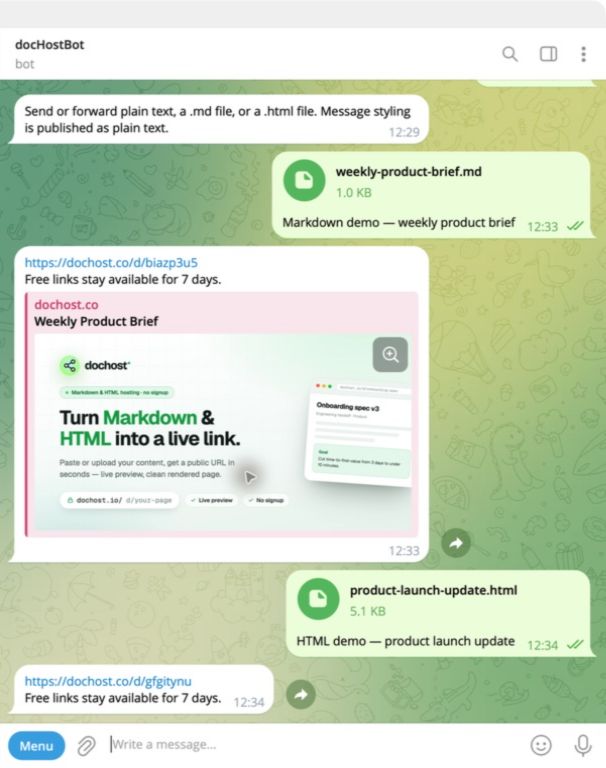
Publish From Telegram: Forward a File, Get a Link Back
The dochost Telegram bot turns a forwarded Markdown or HTML file into a public link without leaving the chat. No account needed, and you can connect one later.
How to Publish a Claude or ChatGPT Page in One Click With the Chrome Extension
The dochost extension adds a Publish button next to the HTML and Markdown your AI writes — including Claude's file cards. Here is the full flow, recorded in a real Claude chat, and what each option in the panel does.
Newsletter
Join the community
Subscribe to our newsletter for the latest news and updates