HTML file to link converter
Upload a .html file or paste the markup and get a clean, shareable URL in seconds — no server setup, no attachment headaches.
Upload or paste your HTML
Drop a .html file or paste the markup — get a shareable link. No account needed to start. Free links last 7 days.
Direct answer: upload your .html file (or paste the HTML) into dochost and you get a public link that opens the rendered page in any browser — no account required to start.
| Free | Pro ($7/mo) | |
|---|---|---|
| File size | 1 MB | 10 MB (Max: 50 MB) |
| Link lifetime | 7 days public / 3 days private | Permanent |
| Live pages at once | 10 | 200 (Max: unlimited) |
| Extend before expiry | From $2.99 for 30 days | Not needed |
| Account to start | No | Optional |
When you have a finished HTML file sitting on your desktop, sending it as an email attachment is a bad idea. Recipients on phones cannot open it, and most email clients block local file downloads outright. If you have been wondering how to share an HTML file as a link instead of a dead attachment, this is it: dochost acts as a straightforward HTML file to link converter — you upload the file or paste the markup, we host it, and you get back a URL anyone can open in a browser. The file renders exactly as it would locally — inline styles, embedded images, scripts included. For a longer walkthrough of five ways to share HTML, see How to share an HTML file as a link.
How to turn HTML into a shareable link (3 steps)
- 1.
Upload your
.htmlfile, or paste the full markup into the card above. Self-contained documents (styles and scripts included) work best. - 2.
Check the live preview — what you see is what recipients will see on any device.
- 3.
Create the link and copy it. Free public links last 7 days (3 if private); extend from $2.99 or upgrade for a permanent URL.
A real example
Maya is a freelance email designer. She has spent two days building a promotional newsletter for a skincare brand: animated GIF header, product grid with inline table layout, a footer with unsubscribe copy. Her email tool exports the finished design as a single file, campaign.html, with all styles inlined and every product image pointing to the brand’s CDN. The client needs to approve the visual before Maya loads it into their ESP.
Sending the raw .html file as an attachment is useless — the client’s marketing manager reviews everything on her iPhone, and iOS Mail will not render a local HTML attachment the way a real browser would. A screenshot will not cut it either; the client specifically wants to scroll through the email at actual size.
Maya opens dochost, drags campaign.html onto the upload card, and gets a URL in about three seconds. She pastes it into her approval message on Slack. The client taps the link on her phone, sees the newsletter rendering correctly — GIF playing, product images loading, fonts intact — and replies with a green light. Maya never had to spin up a staging server or zip anything. The link is live for seven days, which is more than enough time to get sign-off and send the campaign.
Which "HTML to link" did you mean?
This search is four different jobs wearing the same words, and they do not all end on this page. Pick the one that matches what is actually on your screen.
There is a file on your desktop and you want a URL for it.
This page, and the card above. Drag the file in, get a link back in a few seconds, send the link. Nothing is installed and no account is needed to start.
You have markup in your clipboard — from an AI chat, an editor, or a snippet — and never saved it.
Same page. Switch the card to paste, drop the markup in, and publish — you get the same hosted URL without saving a file first. That is the usual shape when the HTML came out of ChatGPT or Claude.
It is a real project directory — index.html plus /css, /js and /images.
This is the branch that does not end here. The uploader takes one file, so a folder loses its stylesheet and images. Either inline the assets into a single self-contained HTML file first, or use a host built for directory deploys.
Hosting a multi-file appIf the project came out of an AI builder, ask it for a single self-contained HTML file — most will produce one on request, and then this page works.
The link is going somewhere permanent — a CV, a README, a business card.
Then the seven-day free link is the wrong product. A paid plan keeps the URL online indefinitely, and you can also extend a page you already published from $2.99 before it lapses.
Plans that keep the linkYou have a URL and you want the HTML or Markdown out of it.
That is the reverse job and it has its own tool — fetch the page and get clean Markdown back, rather than trying to make a link out of something that already is one.
URL to MarkdownFree vs Pro — product facts
Numbers from the live plan limits (1 MB free / 10 MB Pro / 50 MB Max; 7-day free public links; extend from $2.99). They are the same caps the upload panel and pricing page enforce.
| Free | Pro ($7/mo) | |
|---|---|---|
| File size per page | 1 MB | 10 MB (Max plan: 50 MB) |
| Link lifetime | 7 days public / 3 days private | Permanent |
| Live pages at once | 10 | 200 (Max: unlimited) |
| Extend a free page | From $2.99 for 30 days | Not needed — links do not expire |
| Custom slug / password / no branding | No | Yes |
| Account required to publish | No | No (optional for the dashboard) |
Pick Free when the link has a natural shelf life — a review, a demo, a client approval. Pick Pro when the URL has to stay forever, needs a password, or will outgrow 1 MB. A multi-file site with a /css folder still belongs on Netlify or GitHub Pages, not here.
Questions about HTML file to link converter
Do inline styles and embedded images in my HTML file come through correctly?
Yes. dochost serves the file as uploaded, so anything baked into the HTML itself — inline CSS, base64-encoded images, data URIs, and any src attributes pointing to public CDN URLs — renders in the viewer’s browser just as it would locally. We do not strip or rewrite styles. The only thing that will not work automatically is content that requires a separate file we did not receive, such as an external stylesheet you left in a /css folder next to the HTML.
Is there a file-size limit for the HTML file I upload?
Yes. Free (and anonymous) pages are capped at 1 MB. Pro raises the cap to 10 MB; Max to 50 MB. If your file is large because of base64 images, host those images externally and reference them by URL — that also makes the page load faster. See Free plan limits explained.
Does the link show a viewable webpage or let people download the raw file?
It shows a viewable webpage. When someone opens the link, their browser renders the HTML just like any other website — they see the page, not a download prompt. There is no download button shown to viewers by default. This is intentional: the whole point is to give someone a URL they can tap and read, not an attachment they need to save and open locally. Recipients cannot edit the page; the public link is read-only.
How do I share an HTML file as a link instead of an attachment?
Upload it here (or paste the markup) and send the URL you get back. No mail client renders an .html attachment inline — the recipient gets a file to download, and that is where it breaks on phones and locked-down work laptops. A link asks them to tap instead. For five options side by side, see How to share an HTML file as a link.
How long does the free link last, and can I extend it?
A free public link stays live for 7 days (3 days if published as private / link-only). You can extend a single page from $2.99 for 30 days before it expires, or upgrade to Pro for permanent links on every page. Views are unlimited on every plan. This is a hosted-page link, not an <a> tag builder.
What you get back after the conversion
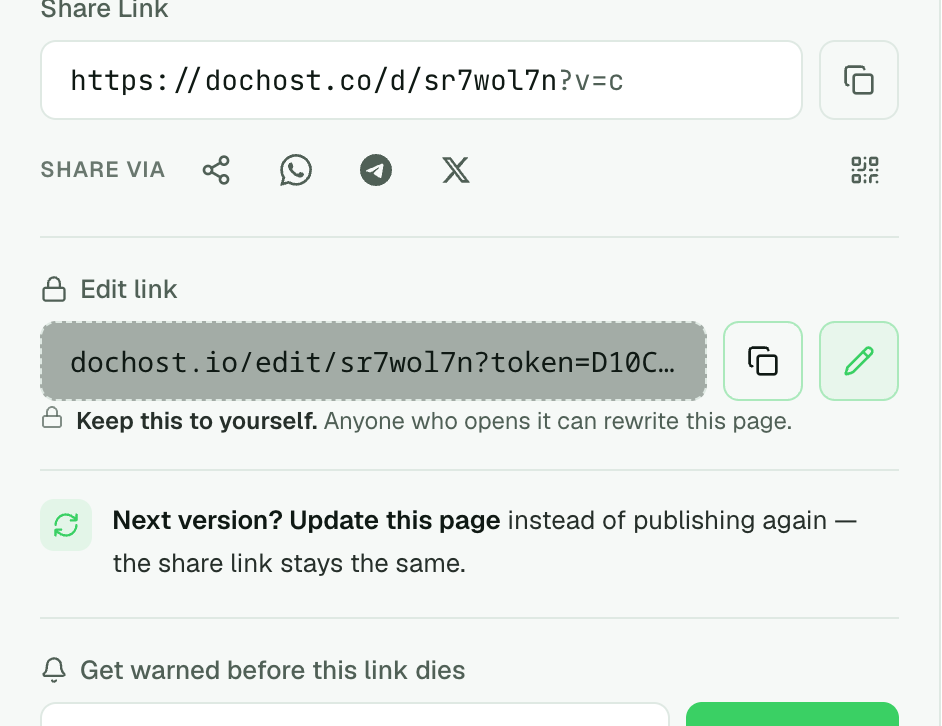
The result is two links, and they do different jobs.
- The share link (
dochost.co/d/…) is the one you send. It opens the page in any browser, and the share buttons under it post it to WhatsApp, Telegram or X, or show a QR code for a screen in a meeting room. - The edit link (
dochost.io/edit/…) is yours alone. Anyone who opens it can rewrite the page, so keep it out of the email you send.
When the file changes, open the edit link and update the page instead of converting it again. The share link stays the same, so everyone who already has it sees the new version without a second message.
Who can open the converted link
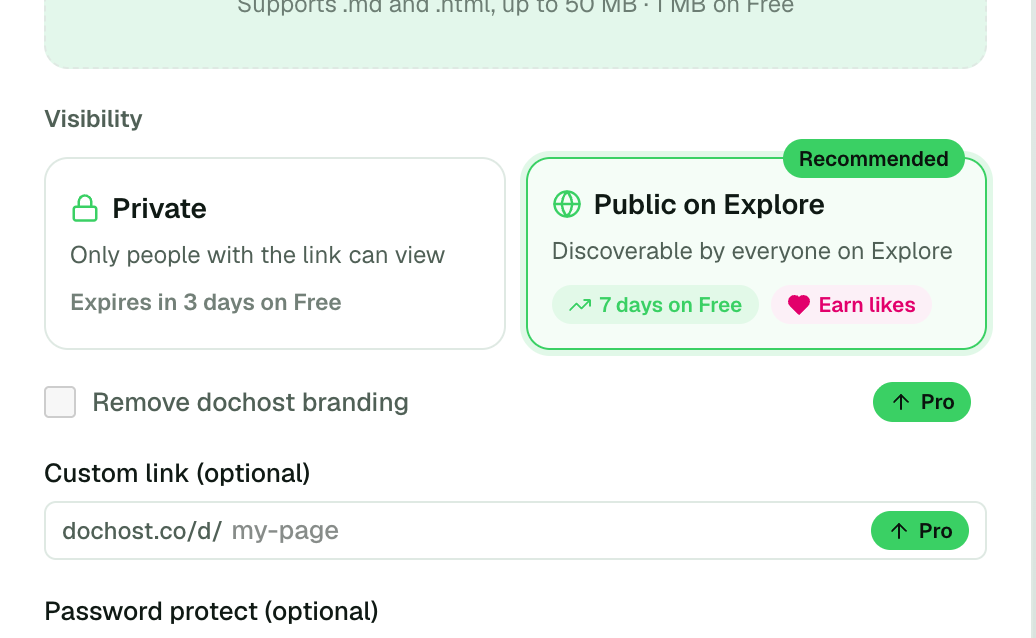
Before you publish you choose one of two settings.
- Private keeps the page link-only: it is not listed anywhere on dochost, and only people you send the URL to will find it. On the free plan it lasts 3 days.
- Public on Explore also lists it on dochost's Explore feed, where other people can find and like it. On the free plan it lasts 7 days.
Neither setting puts the page on Google. Converted pages are served with noindex unless the page is permanent and you switch search engines on for it.
Keep your links forever
Free public pages initially last 7 days; private pages last 3 days. Paid plans support permanent links; trial expiry rules differ.
See pricingRelated use cases
- Free HTML hosting — what the link actually isLimits, comparisons, and when a free host is the wrong tool.
- Free HTML hosting — get a live link without a hosting accountMost “free HTML hosting” means a signup form, FTP, and an ad banner on your page. For a single self-contained HTML file, you need none of that — paste or upload it and get a clean public URL in seconds.
- Publish an HTML website for free — get a link in secondsUpload your HTML file and get a shareable URL. No hosting account, no terminal, no configuration.
- How to open an HTML fileIt opens on the computer you made it on and does nothing on a phone. Here is why, what works on each device, and the one route that works on all of them.
- File to link converter — turn a file into a shareable URLDrop in an HTML, Markdown, or text file and get a public link anyone can open in a browser — no account, and no cloud-storage download page in front of your content.
- Share a Claude artifact as a private linkClaude’s own share link publishes to a page search engines have already crawled. Paste the artifact here instead and the page stays out of search results by default.
- HTML viewer — paste it, see the pagePaste HTML or open a .html file and the rendered page appears next to the source, styles and scripts included. Nothing uploads until you decide to publish it.
- URL to HTML — get the source code of any webpagePaste a web address and get the HTML that page serves: read it, copy it, or download it as an .html file that still loads its images.
- Free temporary HTML hosting — no registration, no cleanupPut a page online for the week it actually matters. Paste your HTML, get a link with no sign-up form in the way, and let the page remove itself when the job is done.
- Turn an HTML file into a live websiteHave an HTML file or a block of HTML? Turn it into a real website at a public URL in seconds — no hosting account, no domain, no deploy.