How to Share a Mermaid Diagram as a Link
The fastest way to turn Mermaid code into a rendered diagram anyone can open in a browser — no screenshots, no repo, and no account required.
Mermaid has quietly become the default way developers describe systems in text. ChatGPT and Claude emit it whenever you ask for a flowchart or sequence diagram. GitHub renders it inside READMEs. Docs tools support it. The one thing that's still awkward is the moment you want to show the diagram to someone outside those contexts — a design review thread, a Slack channel, an email to a stakeholder who will never open your repo.
What most people do is screenshot it. And screenshots of diagrams age badly: the text gets fuzzy when scaled, nobody can copy a node label or search it later, and the moment the diagram changes you're re-cropping and re-uploading. The diagram is text — the sharing format shouldn't throw that away.
The better move is to share the Mermaid code as a rendered page at a URL. Here's the fastest way to do that.
Paste the code, get a link
dochost's Mermaid preview tool takes raw Mermaid (or a Markdown document with Mermaid blocks inside it), renders it live, and publishes it to a short link when you click publish. No account, no repo, no export step.
Say a teammate asks how the new upload path works and you sketch it:
```mermaid
sequenceDiagram
    participant U as User
    participant A as API
    participant S as Storage
    U->>A: POST /upload
    A->>A: Validate + scan file
    A->>S: Store object
    S-->>A: Object key
    A-->>U: 201 + file URL
```
The whole workflow:
- Write (or copy) the Mermaid code. Straight from an AI chat, a README draft, or your editor — the fenced
```mermaidblock works as-is, and bare Mermaid syntax does too. - Paste it into the Mermaid preview. You immediately see the rendered diagram, so you catch syntax errors before anyone else does.
- Click publish and share the link. Whoever opens it sees the drawn diagram in their browser — crisp at any zoom level, with selectable text.
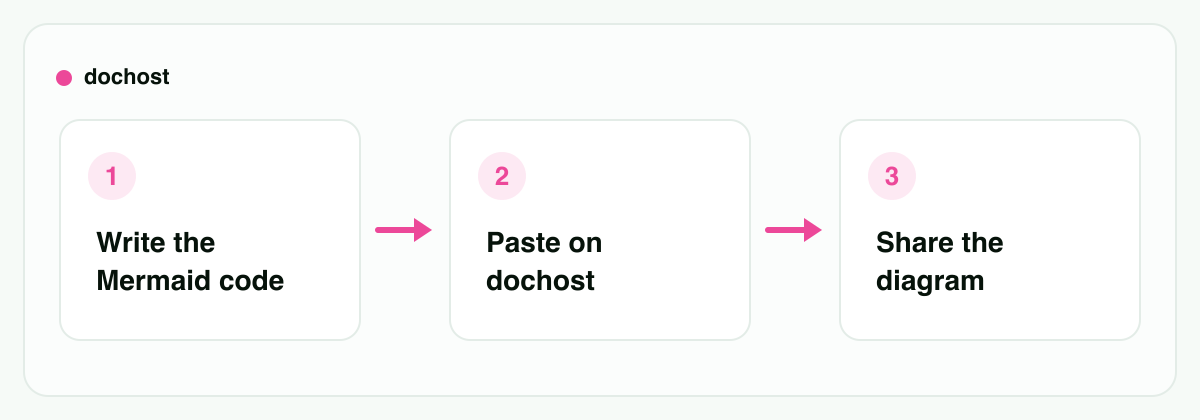
That's the entire process. The person on the other end doesn't need to know what Mermaid is, doesn't need a GitHub account, and doesn't need to trust a file attachment.
Diagrams rarely travel alone
The underrated part of this approach: a diagram usually needs a paragraph of context around it, and a screenshot can't carry that. Because dochost renders full Markdown — headings, tables, code blocks, and Mermaid blocks together — you can publish the diagram inside the document it belongs to.
A few situations where this is exactly what you want:
- Architecture diagram for a design review. Put the proposal text, the component diagram, and the open questions in one Markdown doc. Reviewers get a single link instead of a doc here and a PNG there. The Markdown preview handles the mixed document the same way.
- Flowchart in an incident postmortem. A
flowchart TDof what failed and in what order, sitting right above the timeline table. Whoever reads the postmortem two weeks later sees the actual sequence, not a blurry screenshot pasted into a chat that has since scrolled away. - Sequence diagram for an API discussion. When you're negotiating a contract between two services, a
sequenceDiagramsettles "who calls whom, and when" faster than three paragraphs of prose. Drop the link in the ticket and argue about the arrows, not the wording.
And since the source is text, updating the diagram means editing a few lines and publishing again — not redrawing anything.
If the diagram came from an AI chat
This is increasingly the common case: you asked Claude or ChatGPT to diagram something, and it answered with a Mermaid block that the chat may or may not render — and that the person you want to show it to definitely can't see. Copy the block out and paste it as above, or use the Chrome extension, which adds a one-click publish button directly on ChatGPT and Claude responses. More on that pattern in turning AI output into a link.
Honest alternatives
dochost isn't the only way to get Mermaid in front of someone, and for some jobs it isn't the best one.
mermaid.live is the official Mermaid live editor, and it's excellent for building the diagram: instant re-render as you type, sample templates, export options. If you're still tinkering with the syntax, do it there. It's editor-first, though — what you share is tied to the editing experience rather than being a clean standalone page, which is fine for a fellow developer and less fine for a stakeholder you just want to show something to.
GitHub renders Mermaid blocks in Markdown files, issues, and pull requests. If your audience already lives in the repo, committing the diagram to the README or docs folder is the right long-term home — it's versioned alongside the code it describes. The friction is everything before that: the diagram needs a repo to live in, viewers of a private repo need access, and "let me open a PR" is a heavy answer to "can you show me the flow real quick?"
Use dochost when the goal is a link anyone can open right now, with no account on their side and optionally none on yours — especially when the diagram needs surrounding prose.
How long the link lives
Free links last 7 days — with or without an account — which covers most reviews and discussions. Paid plans make links permanent — plus custom slugs and password protection, which matters if the diagram describes internal architecture you'd rather not leave on a guessable URL. Details on pricing.
For an architecture doc you'll reference for months, permanence (or GitHub) is the right call. For "here's the flow, thoughts?" the anonymous link is exactly the right weight.
Bottom line: Mermaid is text, so share it as text that renders — not as a screenshot. If you're still editing, tinker in mermaid.live; if it belongs in the repo forever, commit it to a Markdown file on GitHub. But when you just need someone to see the diagram, paste it into the Mermaid preview, publish, and send the link.
More Posts
HTML to URL: How to Turn an HTML File Into a Link (Free)
Three ways to convert an HTML file into a working URL, plus the fastest no-setup method when you just need a link to share.

Turn Any AI Output Into a Shareable Link
Every AI tool leaves you with output trapped in a chat window. Here's the neutral step that turns it into one clean link for your team or client.
"This page can't be published": what the safety check caught and how to fix it
dochost runs every link in a page through Google's Web Risk lists before it goes live. When one matches, publishing stops with a short notice and no URL named. Here is what the check looks at, how to find the link that tripped it, and what to change so the same page publishes a minute later.
Newsletter
Join the community
Subscribe to our newsletter for the latest news and updates