What Happens When a dochost Page Expires, and How to Bring It Back
After 7 days a free page shows an expired notice instead of the content. Nothing is deleted: the page, its URL, its views and likes are all kept. Here is what readers see, what the owner sees, and the three ways to put the same link back online.
Free pages live for 7 days (3 if published as Private). The extend guide covers how to act before the deadline. This one is about after it: what the link does once the countdown hits zero, what is and is not lost, and how to bring the same URL back — sometimes weeks later, when someone finally clicks it.
What readers see
The share link keeps working, but it serves a notice instead of the page:
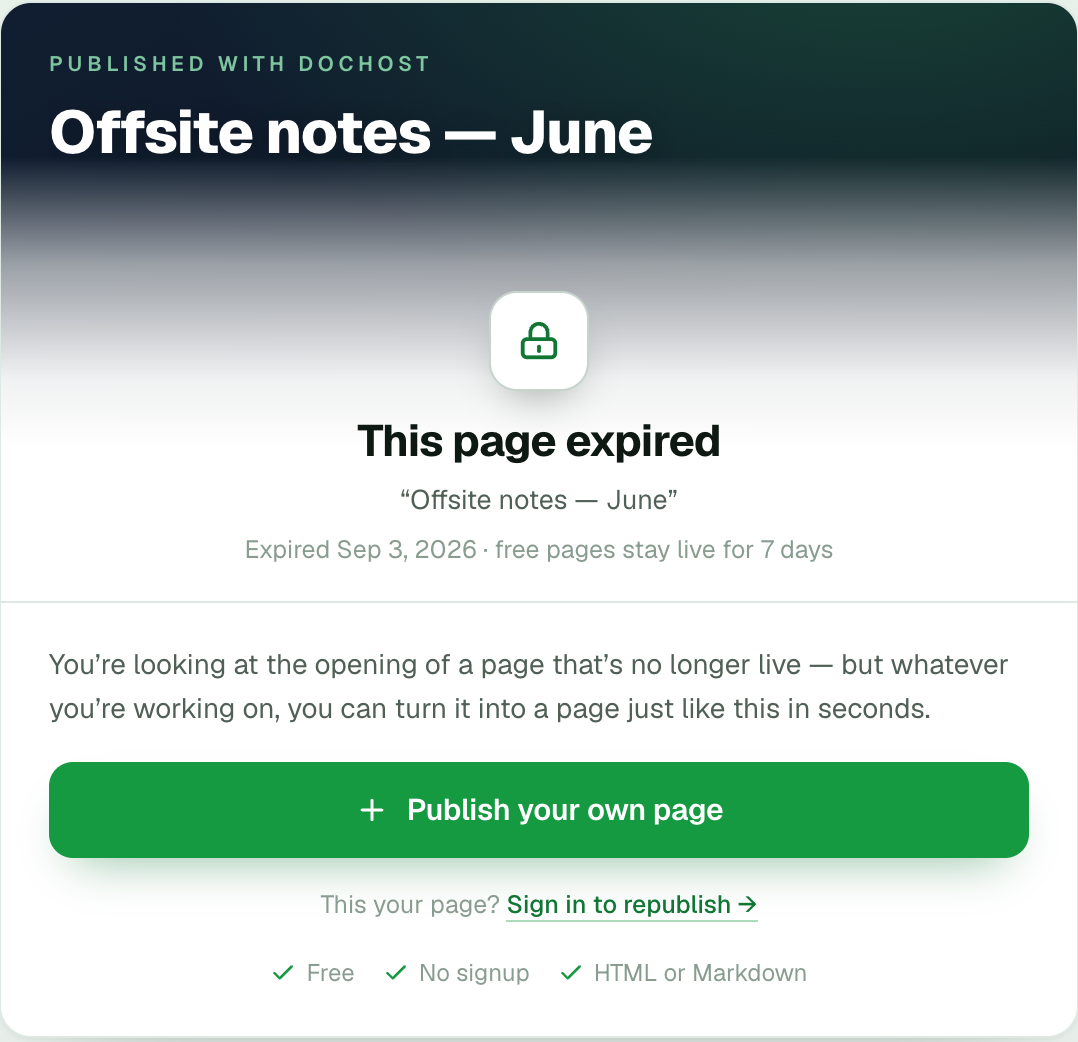
It shows the page's title and the date it expired, and a faded thumbnail of the page's opening above the fold — enough for a reader to recognise what they were sent, not enough to read it. Below that is a Publish your own page button for readers and a Sign in to republish link for the owner. Underneath, a short Still live on dochost row points at pages that are currently public.
Nothing else is served: no body text, no scripts, no downloads. Search engines are told not to index the page (free pages are never indexed anyway — see getting a page indexed), and a like or view on an expired page is not counted.
What is kept
Expiry is a state, not a deletion. On the owner's side the page is intact:
- The URL.
dochost.co/d/{slug}still belongs to this page. A custom slug is kept too, unless it was granted by a Pro trial that lapsed. - The content, at its latest version.
- Views and likes, exactly as they stood at expiry.
- Settings: visibility, password, search-engine listing.
In the dashboard the page stays in the list with an Expired badge and a Republish button where Extend used to be:

That row is the page waiting to come back — with its 41 views and 2 likes, at the same link.
Bringing it back
1. Republish from the dashboard
Click Republish. It goes straight to checkout for 1 month at $2.99, the shortest term. For a longer one, open the page and click Extend this page instead, which offers the full ladder: 1 month $2.99, 3 months $6.99, 12 months $16.99, or Forever $39 (which also removes the dochost badge from that page). Whichever you pick, the new term is counted from now, not from the old expiry date, so a page that lapsed three weeks ago and gets 1 month is live for a full month.
The moment the payment completes the page is live again at the same URL, with its views, likes and settings. Anyone who kept the link — in a chat, a bookmark, a class syllabus — is back on the page without being told anything changed.
2. Sign in, if the page was published without an account
Expired pages published anonymously have no dashboard to click in — until you sign in. Sign in to republish on the expired notice takes you to the dashboard, and pages published from that browser join your account automatically, expired ones included. Then the Republish button above is there.
The edit link from the success panel still opens the editor on an expired page, and saving still works, but saving does not change the expiry. Editing is for content; republishing is for time.
3. Upgrade — for the pages that have not expired yet
A Pro or Max subscription makes every live page on the account permanent, and nothing published afterwards has a countdown. It deliberately does not resurrect pages that had already expired — a dead page coming back on its own would surprise its author as much as its readers — so an already-expired page still needs Republish once. If you have republished the same page twice, the subscription is the cheaper answer from the third time on.
Getting warned instead
Three days before a page expires, dochost emails the address on the account with an Extend link for each page. For a page published without an account, the box on the success panel — Get warned before this link dies — takes an address, sends one confirmation email, and attaches the page to that address when you click it, which is what makes the warning possible. Extending before expiry and republishing after it cost the same and land on the same link, so a missed email is not expensive. But readers who hit the notice in between have seen a dead page, and a class or a client tends to click exactly then.
Two things that do not bring a page back
- Likes. 30 likes extend a live free page by 30 days. An expired page cannot be liked, so the milestone cannot be reached after the fact.
- Publishing the content again. That creates a second page at a new URL with zero views, and the old link keeps showing the expired notice. If the old link is the one people have, republish the old page.
More Posts
dochost Free Plan Limits Explained: 10 Live Pages, 1 MB Each, and What to Do When You Hit Them
The free plan allows 10 live pages of up to 1 MB. Here is exactly what each limit counts, what the two notices look like, how to free a slot or shrink a page without paying, and what Pro and Max raise the numbers to.

Claude Skills vs Projects vs Artifacts: What Each One Actually Is
Three Claude features with overlapping names and completely different jobs. Skills are procedures, Projects are context, Artifacts are output — here's how to tell which one you need.
Markdown to HTML: Convert and Host in One Step
How to convert Markdown to a clean, GitHub-flavored HTML page — and get a public link for it without running a static-site generator.
Newsletter
Join the community
Subscribe to our newsletter for the latest news and updates