HTML formatter & beautifier
Paste messy or minified HTML and get it back cleanly indented, with the CSS and JavaScript inside it formatted too — or minify it. Everything runs in your browser.
Beautify or minify in your browser. Nothing is uploaded unless you choose to publish.
HTML arrives in unreadable shapes. A page exported from a builder is one 40,000-character line. Markup copied out of the browser’s inspector keeps whatever indentation the framework left. An AI chat hands you a working page with a <style> block squashed onto a single line and a script nobody can follow.
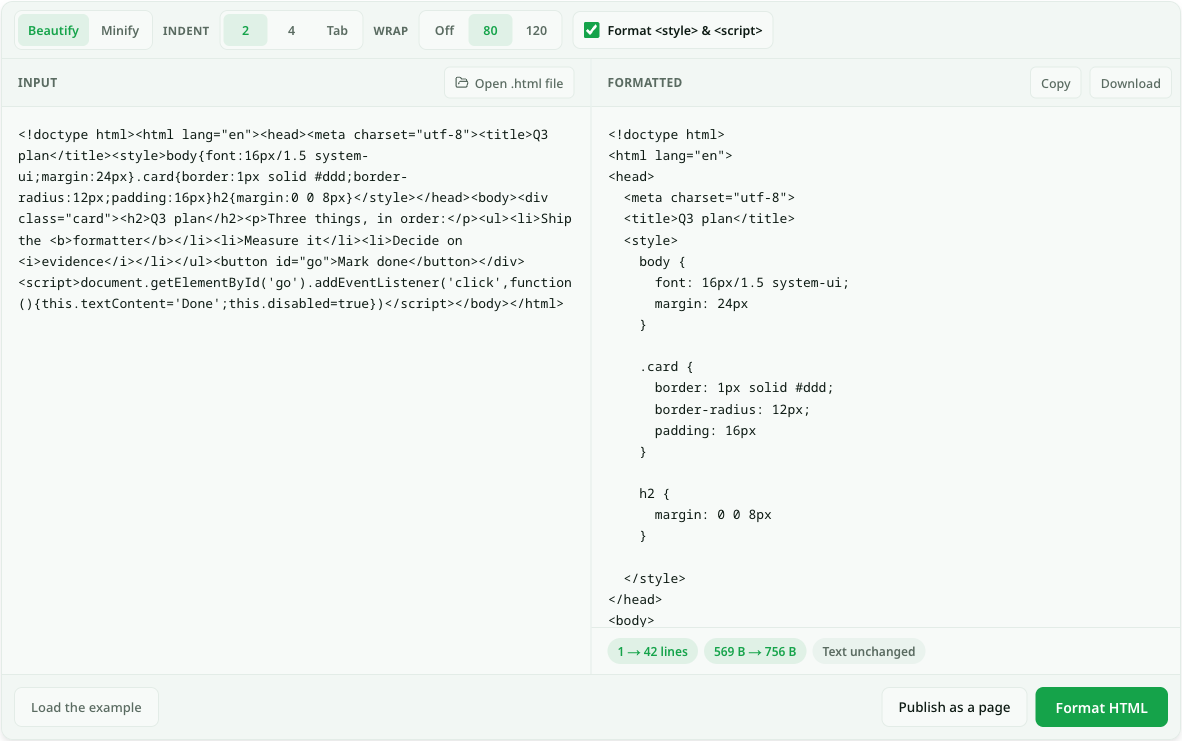
This formatter re-indents the markup so the nesting is visible, one element per line, and formats the CSS inside <style> and the JavaScript inside <script> as well. It only changes whitespace, so the page renders exactly as before — the chip under the output checks that for you by comparing the text of both versions. Going the other way, Minify strips comments and collapses whitespace for a smaller file.
What the formatter changes — and what it leaves alone
- 1.
Indentation and line breaks. Nested elements are indented by 2 spaces, 4 spaces or a tab, one block element per line. Long lines wrap at 80 or 120 characters, or not at all.
- 2.
Embedded CSS and JavaScript. With the box ticked,
<style>and<script>contents are formatted too. Untick it to leave them exactly as written. - 3.
Never touched: the contents of
<pre>and<textarea>, where spacing is part of the content, and your text, attributes and tag names. - 4.
Minify removes comments and collapses every run of spaces to one. It does not delete the space between inline elements, because that space is visible.
Ein echtes Beispiel
A freelancer inherits a client’s landing page as a single index.html exported from a site builder: 612 KB on one line, with the tracking script and three <style> blocks mashed into it. The client wants the hero headline changed and the phone number in the footer fixed.
She opens the file here with Open .html file. At 2-space indent and an 80-column wrap, the one line becomes a few thousand readable ones; the footer is now a <footer> block she can find by scrolling, and the CSS is one rule per line instead of a wall. The chip reads Text unchanged, so she knows nothing but whitespace moved.
She makes the two edits in her own editor, pastes the result back, switches to Minify to hand the client a smaller file, and publishes a preview link so the client can approve the change on their phone before it goes live.
Beautify or minify?
The same markup, pointed in opposite directions. Pick by what happens to the file next.
To read or edit the code
Indented nesting is the whole point of beautifying.
- Beautify
- Yes
- Minify
- No
The smallest file to ship
Comments and repeated whitespace are gone.
- Beautify
- No
- Minify
- Yes
A page that renders exactly as before
Both only change whitespace outside <pre>, <textarea>, <script> and <style>.
- Beautify
- Yes
- Minify
- Yes
Readable CSS and JavaScript inside the page
Minify leaves embedded code as it was.
- Beautify
- Yes
- Minify
- No
Fragen zu html formatter
How do I format HTML code?
Paste the HTML above, or open the .html file, choose the indent — 2 spaces is the common default — and press Format HTML. Copy the result or download it as a file. The page itself renders exactly as before; only the whitespace in the source changes.
What is the difference between an HTML formatter and a beautifier?
None in practice — both names mean re-indenting HTML so its structure is readable. "Beautifier" is the older name, from the js-beautify project this tool uses; "formatter" is what editors such as VS Code call the same operation.
Will formatting break my page?
It should not: browsers treat any run of whitespace in normal text as a single space, and the formatter leaves <pre> and <textarea> alone. The one case to watch is an element your CSS styles with white-space: pre, whose spacing the formatter cannot know is meaningful. The Text unchanged check under the output compares the text of both versions for you.
Is my HTML uploaded?
No. Formatting runs in your browser tab. Nothing is sent anywhere unless you press Publish as a page, which is a separate step that gives you a link to the rendered result.
Can I see the page, not just the code?
Yes — paste the formatted HTML into the HTML viewer to see it render with its scripts running, or publish it to get a link anyone can open.
Links dauerhaft behalten
Kostenlose öffentliche Seiten bleiben zunächst 7 Tage online, private Seiten 3 Tage. Mit einem bezahlten Tarif sind dauerhafte Links möglich; für Testphasen gelten eigene Ablaufregeln.
Preise ansehenÄhnliche Anwendungsfälle
- HTML viewer — paste it, see the pagePaste HTML or open a .html file and the rendered page appears next to the source, styles and scripts included. Nothing uploads until you decide to publish it.
- HTML to image converter (PNG, JPG)Paste HTML or open a .html file. It renders with its own CSS and JavaScript, then downloads as a PNG or JPG at desktop, tablet or phone width. Nothing is uploaded.
- Markdown formatter — clean up messy Markdown in one clickPaste Markdown straight out of ChatGPT or Claude and get properly formatted source back: consistent list markers, aligned tables, no stray escape characters. Then publish it as a shareable link.
- HTML to text converterStrip the tags and keep the reading. Paste HTML and get plain text with its paragraphs, lists and tables still intact.