Rentry vs dochost: Two Ways to Share Markdown as a Link
An honest look at when Rentry's anonymous, permanent Markdown pages beat dochost — and when rendered HTML, Mermaid diagrams, and LaTeX math change the call.
Rentry.co is one of those tools that people get quietly attached to. It's a Markdown pastebin that's been running since 2017: paste Markdown, optionally pick a custom URL and an edit code, publish, done. No account, no ads shoved in your reader's face, no upsell screens. Pages stick around indefinitely. It's minimal in the way software used to be minimal — on purpose.
dochost plays in the same space — paste something, get a link — but it's built around a different question. Rentry asks "how do I put this Markdown text on the internet?" dochost asks "how do I put this document on the internet?" Most of the time those overlap. The interesting cases are where they don't.
What Rentry gets right
Let's start with the honest part, because Rentry earns its reputation.
It's genuinely anonymous and genuinely permanent. You don't create an account. You publish, and Rentry states that entries are kept indefinitely unless they break the rules or you delete them. That combination — no identity, no expiry — is rare, and it's exactly why whole communities standardized on Rentry for guides, lists, and long-lived reference pages.
Edit codes are a clever auth model. When you publish, you set an edit code — a passphrase that lets you (or anyone you give it to) edit or delete the page later. There's also a separate "modify code" that allows editing the text without being able to move or claim the URL. It's account-less collaboration: hand a teammate the code and you're both editors, no invites, no login.
Custom URLs are free. You can pick rentry.co/your-name at publish time (2–100 characters), no payment required. On dochost, a custom slug is a paid feature.
The Markdown dialect is deep. Rentry's formatting guide goes well past standard Markdown: tables, syntax-highlighted code blocks, task lists, table-of-contents generation, admonition/callout boxes, spoiler tags, text colors, image sizing and float positioning, even centered and right-aligned text. If you live inside Markdown, there's real power here. There's a CLI and an API too.
If your job is "publish a text document anonymously and have it live forever at a nice URL," Rentry is arguably the best free tool on the internet for that. Full stop.
Where the line is: Markdown in, Markdown out
Rentry is a Markdown service, and it's strict about it. Its own guide states that raw HTML tags aren't supported. Paste an HTML file into Rentry and you don't get a web page — you get your markup treated as text. There's no path from "ChatGPT wrote me a styled HTML report with a chart in it" to a working page on Rentry, because running author HTML simply isn't what it does.
The same guide doesn't cover Mermaid diagrams or LaTeX math either. For a lot of pastes that never matters. But if your document came out of an AI assistant, there's a decent chance it contains exactly those things — a Mermaid architecture diagram, a formula, or a full HTML page — because that's what these models produce when you ask for anything visual.
The other soft limit is the frame. A Rentry page looks like Rentry: a clean text column in Rentry's chrome. There's a metadata system for customizing appearance within that style, but you're styling a Rentry page, not publishing your own. For a fandom guide that's a feature — readers know what a Rentry link is. For a client-facing proposal, it reads as what it is: a paste.
What dochost does with the same paste
The publish motion is nearly identical: paste into a box, see a live preview, click publish, get a short link. No account needed. The difference is what the link opens.
Markdown becomes a clean themed document page — headings, tables, code blocks, task lists — and the extras that AI-era documents actually contain render too: Mermaid diagrams draw as diagrams and LaTeX math typesets properly, no preprocessing.
HTML is the bigger fork. Paste a full HTML file and dochost publishes the page: inline CSS applies, JavaScript runs as written, CDN-loaded fonts and frameworks work. A dashboard, a quiz, a one-page report with charts — the reader gets the working thing, not the source. That's a category Rentry deliberately doesn't touch. If that's your case, turning HTML into a URL is the whole job.
Editing takes the conventional route instead of codes: sign in with a free account and your pages are tied to you, manageable from anywhere — no passphrase to remember or lose.
And because so much shareable Markdown and HTML now originates in a chat window, there's a Chrome extension that puts a publish button directly inside ChatGPT and Claude — one click from AI answer to rendered link, no paste hop at all.
The lifespan trade
This is the one comparison where the two tools flatly disagree, so it deserves its own paragraph.
Rentry: permanent, for free, anonymously. dochost: free links last 7 days (account or not), and permanence is a paid feature (which also brings custom slugs, password protection, and branding removal).
If unconditional permanence is the requirement — an archive, a community resource, a page you want findable in three years without maintaining anything — Rentry wins that trade outright, and it would be silly to pretend otherwise. dochost's lifespans are tuned for the opposite pattern: documents shared for review, for a class, for this sprint, where a link that quietly expires is closer to a feature than a flaw.
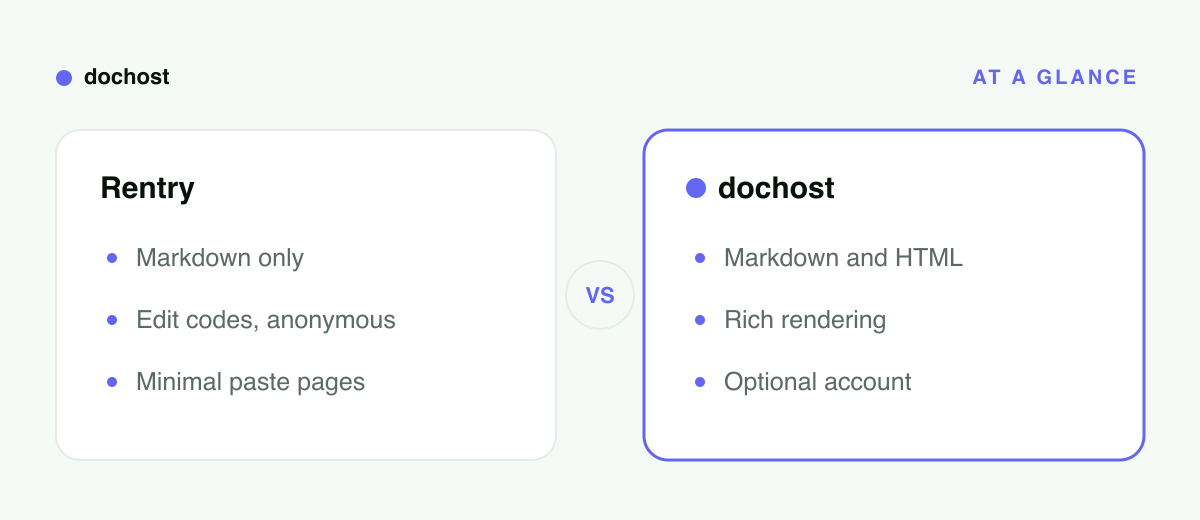
At a glance
| Rentry | dochost | |
|---|---|---|
| Built for | Anonymous Markdown pastes | Markdown and HTML documents |
| Account required | No (edit code per page) | No |
| HTML support | No raw HTML tags | Full pages — CSS + JS run live |
| Mermaid / LaTeX | Not in its formatting guide | Both render |
| Custom URL | Free at publish time | Paid feature |
| Editing | Edit code / modify code | Via your (free) account |
| Link lifespan | Indefinite | 7 days free, permanent paid |
Choosing between them
Use Rentry when anonymity plus permanence is the point: community guides, resource lists, anything that should outlive you caring about it, published under no identity. Also when you want a free custom URL, or when the edit-code model — sharing editorship via a passphrase — fits how your group works. Rentry's community norms exist for a reason; if you're publishing into one of those communities, use the tool they trust.
Use dochost when the output should look and behave like a finished document rather than a paste: Markdown with diagrams or math, any HTML at all, AI-generated reports and mini-apps, client- or teacher-facing pages. If it started life in ChatGPT or Claude, the extension makes it a one-click publish.
Bottom line: Rentry is the best anonymous permanent home for pure Markdown text, and if that's your need, use it happily. The moment your document has HTML, a diagram, math, or an audience that expects a polished page, paste it into dochost and send the rendered link instead.
More Posts
Turn Any AI Output Into a Shareable Link
Every AI tool leaves you with output trapped in a chat window. Here's the neutral step that turns it into one clean link for your team or client.

How to Make a One-Page Website With ChatGPT (No Hosting Setup)
Prompt ChatGPT for a single self-contained HTML page, iterate in chat, then paste it on dochost and get a live link — no hosting account, no deploy.
Tiiny.host vs Netlify Drop: The Fastest Way to Put One HTML File Online
A head-to-head look at Tiiny.host and Netlify Drop for getting a single HTML file online — setup, accounts, free-tier limits, and where dochost fits.
Newsletter
Join the community
Subscribe to our newsletter for the latest news and updates