Publish a Playwright HTML Report from GitHub Actions to a PR
Copy a GitHub Actions workflow that publishes your Playwright HTML report to DocHost and updates the same report URL and pull request comment on every push.
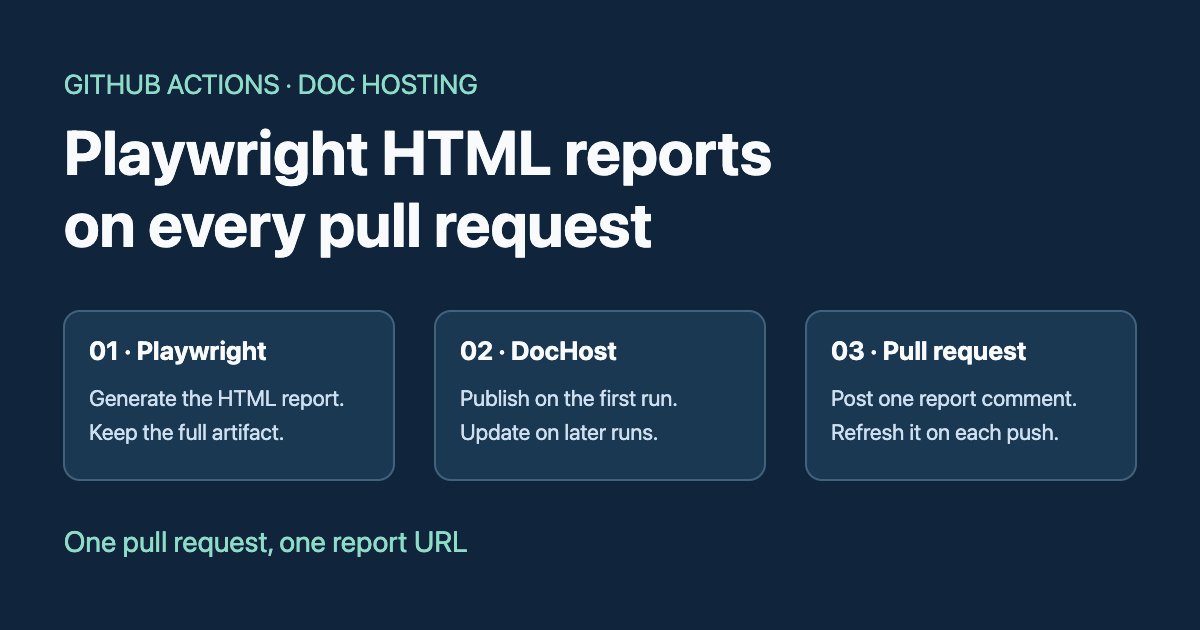
To share a Playwright HTML report from GitHub Actions, run Playwright with the HTML reporter, upload the complete report folder as a GitHub artifact, and publish its index.html to DocHost. The workflow below adds one comment to the pull request. Later commits replace the report at the same URL and edit that comment to point at the latest Actions run.
The diagram above shows where the two outputs go. The browser link gives reviewers a quick way to see test results. The complete artifact keeps the traces, screenshots, videos and other files that Playwright may store alongside index.html.
1. Set up the repository secret
Use a repository with Playwright Test installed, an npm lockfile, and a Playwright project named chromium. If your tests need a local app server, configure Playwright’s webServer in your project as usual. Playwright CI setup
Create a DocHost API key in Settings → API Keys. In GitHub, open your repository’s Settings → Secrets and variables → Actions, then save it as a repository secret named DOCHOST_API_KEY. The publish job reads it from the environment. DocHost API key walkthrough
2. Copy the GitHub Actions workflow
Save the workflow as .github/workflows/playwright-dochost.yml. If you use pnpm or a browser project with a different name, change the install and test commands to match. Download the YAML
name: Playwright report

on:
  pull_request:
    types: [opened, synchronize, reopened]

permissions:
  contents: read

concurrency:
  group: playwright-dochost-${{ github.event.pull_request.number }}
  cancel-in-progress: false

jobs:
  test:
    runs-on: ubuntu-latest
    timeout-minutes: 20
    steps:
      - uses: actions/checkout@v6
        with:
          persist-credentials: false
      - uses: actions/setup-node@v6
        with:
          node-version: 24
          cache: npm
      - run: npm ci
      - run: npx playwright install --with-deps chromium
      - name: Run Playwright
        run: npx playwright test --project=chromium --reporter=html
        env:
          CI: 'true'
          PLAYWRIGHT_HTML_OPEN: never
          PLAYWRIGHT_HTML_OUTPUT_DIR: playwright-report
      - name: Save complete report and attachments
        if: ${{ !cancelled() }}
        uses: actions/upload-artifact@v6
        with:
          name: playwright-report
          path: playwright-report/
          if-no-files-found: ignore

  share:
    needs: test
    if: >-
      ${{ !cancelled() && github.event.pull_request.head.repo.full_name == github.repository
          && github.actor != 'dependabot[bot]' }}
    runs-on: ubuntu-latest
    timeout-minutes: 5
    permissions:
      pull-requests: write
    steps:
      - uses: actions/download-artifact@v7
        with:
          name: playwright-report
          path: playwright-report
      - name: Publish report and update PR comment
        uses: actions/github-script@v8
        env:
          DOCHOST_API_KEY: ${{ secrets.DOCHOST_API_KEY }}
          TEST_RESULT: ${{ needs.test.result }}
        with:
          script: |
            const fs = require('node:fs');
            const key = process.env.DOCHOST_API_KEY;
            if (!key) throw new Error('Set the DOCHOST_API_KEY repository secret.');

            const body = fs.readFileSync('playwright-report/index.html', 'utf8');
            const marker = '<!-- dochost-playwright-report -->';
            const { owner, repo } = context.repo;
            const issue_number = context.payload.pull_request.number;
            const runUrl = `${process.env.GITHUB_SERVER_URL}/${process.env.GITHUB_REPOSITORY}/actions/runs/${context.runId}`;

            async function call(name, args) {
              const response = await fetch('https://dochost.io/api/mcp', {
                method: 'POST',
                headers: {
                  Authorization: `Bearer ${key}`,
                  'Content-Type': 'application/json',
                  Accept: 'application/json, text/event-stream',
                },
                body: JSON.stringify({
                  jsonrpc: '2.0', id: 1, method: 'tools/call',
                  params: { name, arguments: args },
                }),
                signal: AbortSignal.timeout(30_000),
              });
              if (!response.ok) throw new Error(`DocHost ${name}: HTTP ${response.status}`);
              const { result, error } = await response.json();
              if (error || result?.isError || !result?.structuredContent) {
                throw new Error(`DocHost ${name} failed. Check API key, page access and file size.`);
              }
              return result.structuredContent;
            }

            const { data: pr } = await github.rest.pulls.get({ owner, repo, pull_number: issue_number });
            if (pr.head.sha !== context.payload.pull_request.head.sha) {
              core.notice('Skipping a superseded commit.');
              return;
            }

            const comments = await github.paginate(github.rest.issues.listComments, {
              owner, repo, issue_number, per_page: 100,
            });
            const previous = comments.find(({ user, body }) =>
              user?.login === 'github-actions[bot]' && body?.startsWith(marker + '\n'));
            const slug = previous?.body.match(/^<!-- dochost-slug: ([a-z0-9-]{1,64}) -->$/m)?.[1];
            if (previous && !slug) throw new Error('Existing report comment is missing its DocHost slug.');

            let report;
            if (slug) {
              const live = await call('get_page_content', { slug });
              if (!live.editable) throw new Error('The existing report is not editable.');
              await call('update_page', {
                slug, body, format: 'html', ifVersion: live.version,
                ...(live.sha256 ? { ifSha: live.sha256 } : {}),
              });
              report = live;
            } else {
              report = await call('publish', { body, format: 'html', public: false });
            }

            const url = new URL(report.url);
            if (url.protocol !== 'https:' || !/^[a-z0-9-]{1,64}$/.test(report.slug)) {
              throw new Error('DocHost returned an unexpected URL or slug.');
            }
            const comment = [
              marker,
              `<!-- dochost-slug: ${report.slug} -->`,
              '### Playwright HTML report',
              `[Open the report](${url.href}) · [Actions run and full artifact](${runUrl})`,
              `Test job: **${process.env.TEST_RESULT}** · Commit: \`${pr.head.sha.slice(0, 7)}\``,
            ].join('\n');

            if (previous) {
              await github.rest.issues.updateComment({ owner, repo, comment_id: previous.id, body: comment });
            } else {
              await github.rest.issues.createComment({ owner, repo, issue_number, body: comment });
            }
The test job keeps its original pass or fail result. If Playwright produces a report on a failed test run, the artifact upload and the separate share job still run. For fork PRs, the workflow runs tests and uploads the artifact, while the share job skips the DocHost write and PR comment. The share job downloads the artifact without checking out or running PR code. Its GitHub token can write PR comments. GitHub Actions workflow syntax
3. Check the report link on the pull request
Open a pull request from a branch in the same repository. When the workflow finishes, look for the Playwright HTML report comment and open its report link. Push a change that alters a test result or test title. Open the same report URL after the next run and check that the changed result appears. The original comment should now show the newer commit and Actions run.

The first run calls publish with public: false and stores the returned slug in a hidden marker in the bot’s comment. Later runs read that slug, fetch the current page version, and call update_page. The version check rejects an intervening edit instead of overwriting it. Runs are serialized per PR and a run checks the current head before writing. If a comment is deleted, a later run has no slug to recover and creates a fresh report.
What reviewers can open
Share only reports whose contents are suitable for everyone who might receive the link. public: false keeps the report off Explore. Anyone with the URL can read it without an account. Use the GitHub artifact for reports with sensitive test data, internal URLs, screenshots or credentials.
The hosted page contains one HTML file. The tests and results embedded in that file can be browsed there. For linked attachments or Trace Viewer assets, use the artifact from the Actions run, extract it, and run npx playwright show-report <extracted-folder>. Playwright HTML reports
FAQ
Can I publish the report when a test fails?
Yes, if Playwright finished writing index.html. The upload step still runs after test failures and the failed job stays visible in GitHub. If a setup error prevents the report from being created, check the test job logs.
Does each push get a new DocHost link?
The first successful publication creates the URL. Later runs reuse the slug saved in the bot comment and update the page. The comment changes to show the latest run and commit.
How long does the link stay available?
A free link published off Explore lasts three days. An update preserves the existing expiration date. Use a permanent plan if reviewers need the link beyond the free window. If you need the history of individual runs, keep the artifacts in GitHub.
Can a fork pull request publish a report?
This workflow skips the publish job for forks and Dependabot. Reviewers can still use the GitHub artifact when the tests are allowed to run.
To try publishing a standalone HTML report in the browser, open the client report demo.
Author

Categories
More Posts
How to Publish a Page From Telegram With @dochost_bot
Send text, a .md file or an .html file to @dochost_bot and it replies with a public link. This guide covers what to send, what comes back, how to connect your account with /link so pages become permanent, and the few things the bot deliberately does not do.
How to Share Math Notes Online (With LaTeX Rendering)
Turn Markdown notes full of LaTeX equations into a clean, shareable web page — no Overleaf project, no PDF export, no screenshots of handwriting.
How to Share the HTML ChatGPT Writes (Without Saving a File)
ChatGPT writes you a full HTML page, but it's stuck in the chat as code. Here's how to turn it into a link your team or client can open.
Newsletter
Join the community
Subscribe to our newsletter for the latest news and updates