How to Make a One-Page Website With ChatGPT (No Hosting Setup)
Prompt ChatGPT for a single self-contained HTML page, iterate in chat, then paste it on dochost and get a live link — no hosting account, no deploy.
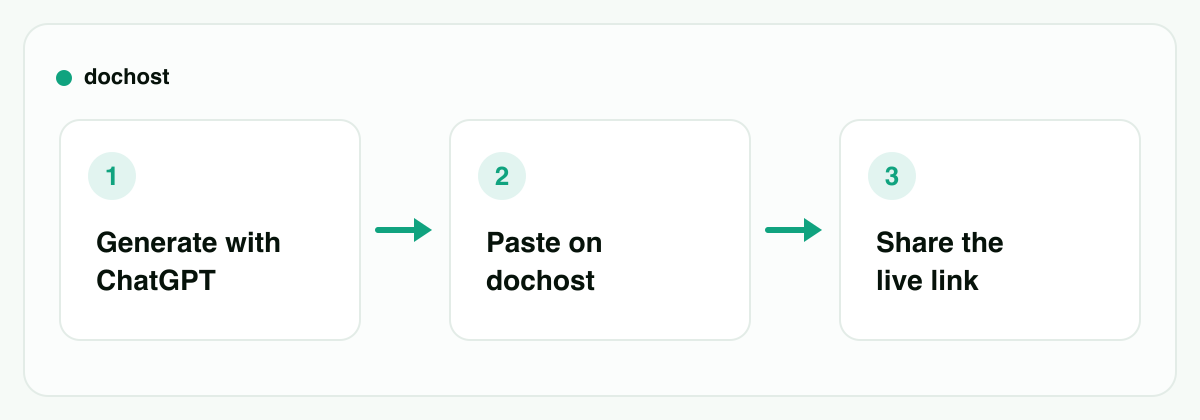
You don't need a site builder, a domain, or a deploy pipeline to put one page on the internet. ChatGPT can write a complete single-file website — HTML, CSS, and any JavaScript it needs, all in one block of code. The only thing it can't do is host it. That last step takes about ten seconds: paste the code, click publish, get a link. Here's the whole workflow.
Step 1: prompt for a single self-contained file
The one instruction that makes everything downstream easy: ask for one HTML file with everything inline. If you just say "make me a website," ChatGPT may split the output into index.html, styles.css, and script.js — three files you'd have to stitch back together. Ask for one file and there's nothing to assemble.
Two prompts that work well as-is:
A personal intro page:
Build a one-page personal website for me as a single HTML file with all CSS inline in a <style> tag. I'm a freelance photographer in Lisbon. Sections: a short intro, three services with one-line descriptions, and a contact section with my email. Dark background, one accent color, generous whitespace. No external files.
An event invite page:
Create a one-page event invitation as a single self-contained HTML file. Event: a rooftop dinner on August 14th at 7pm. Include the date and time prominently, a short description, an "add to calendar" note, and an RSVP section pointing to my email. Warm colors, large type, must look good on a phone. All CSS inline, no images from local paths.
The same pattern works for a small product landing page: name the product, list the three sections you want (headline, features, call to action), describe the mood in a few adjectives, and end with "single HTML file, all CSS inline."
Step 2: iterate in the chat, not in a code editor
The first version is a draft. This is where ChatGPT beats a template site builder: you revise in plain English.
- "Make the headline bigger and move the contact section to the top."
- "The accent color is too neon — try something closer to burnt orange."
- "Add a simple FAQ section with three questions that expand when clicked."
Each time, ask it to return the full updated file, not just the changed lines. Models love to reply with a fragment ("replace the <header> with this…"), and hand-merging fragments is how pages break. "Give me the complete file again" fixes that.
You can preview as you go: paste the current version into the HTML-to-URL tool and the preview renders it exactly as a browser will — including on your phone, which is where half your visitors will see it.
Step 3: publish it and get a live link
When the page looks right, copy the whole code block (the copy icon in ChatGPT grabs everything, including the <!doctype html> line) and paste it on dochost. You see a live preview, click publish, and get a short link you can put in a bio, a group chat, or a QR code. No account required.
If you install the Chrome extension, it's even shorter: a publish button appears right on the code block inside ChatGPT, and one click gives you the link without leaving the chat. When you iterate and want the new version live, publish again — you get a fresh link for the fresh page.
Inline CSS and JavaScript run exactly as written, and CDN-hosted assets load, so the page your visitor sees is the page ChatGPT built — fonts, colors, the FAQ accordion, all of it.
Prompting tips that actually matter
Most "100 ChatGPT prompts" lists are filler. For a publishable one-page site, only a few instructions change the outcome:
- "One file, everything inline." The non-negotiable. All CSS in a
<style>tag, all JavaScript in a<script>tag. A self-contained file works anywhere; a three-file project works nowhere without a build step. - CDN links are fine. Google Fonts, Tailwind via CDN, a chart library — these load from public URLs, so they work on the published page. If ChatGPT reaches for a framework, let it, as long as it's loaded from a CDN and not an
npm install. - No local image paths.
<img src="./photo.jpg">points to a file on nobody's disk — it will render as a broken image. Tell ChatGPT: "no local image paths — use CSS gradients, inline SVG, or images hosted at a public URL." Inline SVG in particular is underrated; ChatGPT can draw icons, dividers, and simple illustrations directly in the markup. - Say "must look good on a phone." One sentence gets you a responsive viewport tag and mobile-friendly sizing. Forget it and you may get a desktop-only layout.
- Describe the mood, not the CSS. "Warm, editorial, lots of whitespace" produces better results than dictating pixel values. Save specific overrides ("make the heading 20% bigger") for the iteration round, when you can see what you're correcting.
What this is — and isn't
Honest limits, so you pick the right tool:
This is a one-page site. An intro page, an invite, a launch page, a menu, a résumé — anything that fits on a single scrolling page. That covers more than you'd think, but it's not a ten-page site with navigation, and there's no CMS: to change the content, you edit the HTML (or ask ChatGPT to) and publish again. If you need multiple pages, a blog, or non-technical people editing content through an admin panel, use a real site builder or a static host with a generator — that's what they're for.
Link lifespan depends on your plan. Free links last 7 days, with or without an account — plenty for an event invite that expires anyway. Paid plans make links permanent, with a custom slug so the URL reads like your page instead of a random string. For a personal intro page you'll share for months, see pricing.
Read any JavaScript before you share it. For a static intro or invite page there's usually nothing to execute. If ChatGPT added interactivity, skim the script — the same habit you'd apply to any AI-generated code.
If your case is simpler — ChatGPT already wrote some HTML mid-conversation and you just want someone to see the result — the shorter version of this workflow is covered in how to share the HTML ChatGPT writes.
Bottom line: ChatGPT handles the design and the code; hosting is the only missing piece, and pasting one file fills it. Prompt for a single self-contained HTML page, iterate in chat, then publish it with a paste — or one click from the extension — and send the link.
More Posts
How to Download a Claude Artifact (and What You Actually Get)
Claude's download button hands you a file — but which file depends on how the artifact was built, and a React artifact won't open in your browser. Here's what each type gives you and what to do with it.

Rentry vs dochost: Two Ways to Share Markdown as a Link
An honest look at when Rentry's anonymous, permanent Markdown pages beat dochost — and when rendered HTML, Mermaid diagrams, and LaTeX math change the call.
Tiiny.host vs Netlify Drop: The Fastest Way to Put One HTML File Online
A head-to-head look at Tiiny.host and Netlify Drop for getting a single HTML file online — setup, accounts, free-tier limits, and where dochost fits.
Newsletter
Join the community
Subscribe to our newsletter for the latest news and updates