Can You Share a ChatGPT Site Link? Who Can Open It, and When dochost Fits Better
Yes, if you publish it to the right audience. Who can open a ChatGPT Sites link, when visitors need a ChatGPT account, which plans include Sites, and when a plain HTML link is the simpler choice.
Short answer: yes. A ChatGPT Site has its own URL, and you can share it, but only the people its access setting allows can open it. A new Site starts out visible only to you (and your workspace admins). To let anyone open the link without a ChatGPT account, you have to publish it to Anyone on the internet, which needs a paid ChatGPT plan, and in Enterprise workspaces an admin who has turned public publishing on.
Everything below comes from OpenAI's help article Creating and using ChatGPT Sites, checked on 16 October 2026. Sites is a new feature and OpenAI updates that page often, so check it before you rely on a detail.
What ChatGPT Sites is
Sites is ChatGPT's own way to build and host a small website or app. You describe what you want in Work on ChatGPT web (or in Work or Codex in the desktop app), mention "website" or @Sites in the prompt, review the private preview, and ask for changes until it is ready. When you deploy, ChatGPT gives the Site a URL.
Two things to know before you start:
- It is not on the free plan. Sites is available to ChatGPT Plus and Pro accounts and to supported Business and Enterprise workspaces. It is not in the ChatGPT Classic app.
- Building costs usage. Building or editing a Site counts toward your Codex usage; running and hosting it (traffic and storage) is counted separately.
Who can open your Site link
The link is only as open as the Site's Share setting. You pick one audience under Who has access:
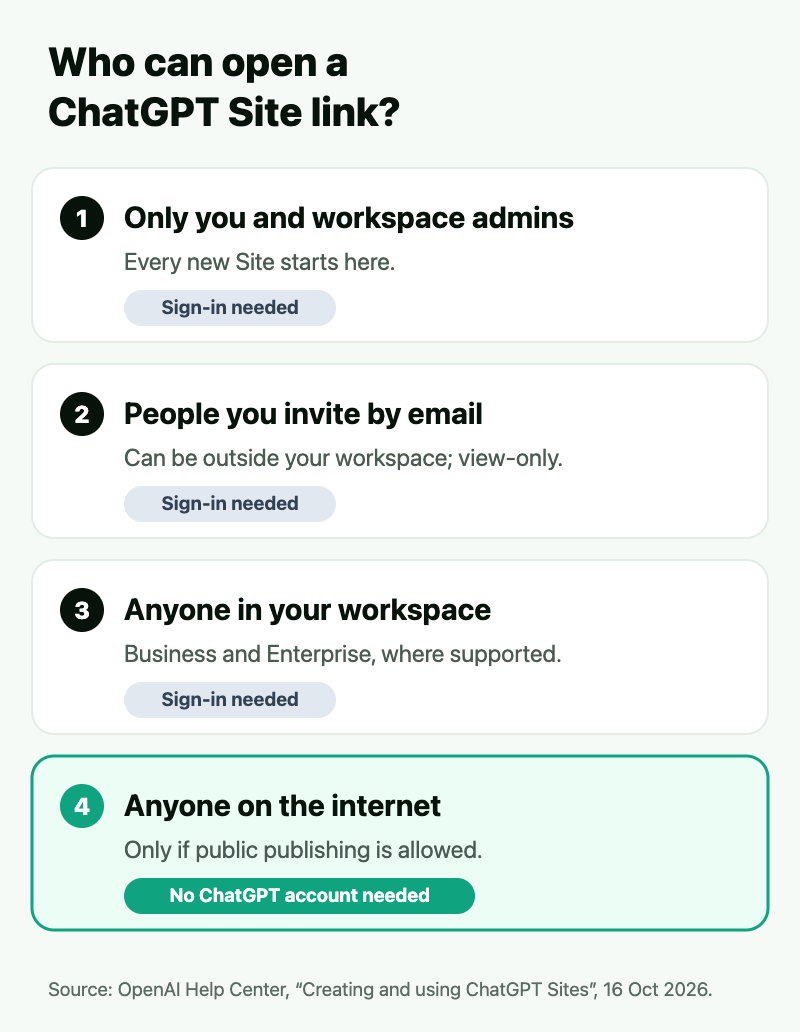
- Owner and workspace admins. Every new Site starts here, so a link you copy straight after building it will not open for anyone else.
- Selected people and named external viewers. You can invite someone outside your workspace by email, but they have to sign in with the ChatGPT account that received the invitation, and they can only view.
- Anyone in the workspace, where your workspace supports it.
- Anyone on the internet, only when public publishing is enabled. OpenAI's article says anyone can open a public Site without signing in to ChatGPT. In Enterprise workspaces public publishing is off until an admin enables it.
So the question "can I share my ChatGPT Site link?" really has two parts: whether your plan and workspace let you publish publicly, and whether you have actually changed the Site's audience before sending the link.
Publishing, updating and taking it down
- Every deploy is live. OpenAI's article calls each deployment URL a production URL. To check a change without updating what visitors see, save a version first and deploy after you have reviewed it.
- Edits go through ChatGPT. You reopen the Site's chat (or select it under Sites), describe the change and publish again. The owner can give another member of the same workspace Can edit access.
- Custom domains are possible where available. You need to own the domain already and add the DNS records Sites gives you; Sites will not register one for you, and custom domains were not available in Enterprise workspaces at launch.
- Taking it down means narrowing the Share setting back to selected people or just yourself, or deleting the Site. Deletion is permanent.
When a plain HTML link fits better
ChatGPT Sites is the better tool when the thing you are building is an app: it has a database (up to 10 GB per Site), it can use your workspace's connected apps, and it lives inside the ChatGPT account where you keep editing it.
It is more than you need when what you have is one page and someone simply has to open it. That is the job dochost does:
| ChatGPT Sites | dochost | |
|---|---|---|
| Plan needed to publish publicly | Plus, Pro, or a workspace that allows public publishing | None: no account at all |
| Where the HTML can come from | Built inside ChatGPT | Anything: ChatGPT, Claude, Gemini, a file on your disk |
| Who can open the link | Depends on the Share setting; only "Anyone on the internet" skips sign-in | Anyone with the link, no sign-in |
| How long it stays up | Until you restrict or delete it | 7 days free (3 days if private); permanent on a paid plan |
| Password on a page | Not covered in OpenAI's article | Paid plans |
| Databases, connected apps | Yes | No: static pages, though the page's own JavaScript runs |
The practical rule: if you are on ChatGPT's free plan, if the HTML came from another assistant, or if you just need a working link to one page in the next minute, copy the HTML and paste it into dochost. If you are building something people will log into and use every week, build it as a Site.
FAQ
Can I share my ChatGPT Site link? Yes, but first set who can open it under the Site's Share button. A new Site is visible only to you and your workspace admins, so a link copied straight after building will not open for anyone else.
Do people need a ChatGPT account to open a ChatGPT Site? Not if the Site is published to Anyone on the internet: OpenAI says anyone can open a public Site without signing in. Invited people, including external viewers, must sign in with the ChatGPT account that received access.
Can I use ChatGPT Sites on the free plan? No. Sites is available to ChatGPT Plus and Pro accounts and supported Business and Enterprise workspaces. To share one HTML page that ChatGPT wrote on the free plan, paste it into dochost instead; no account is needed.
How do I take a ChatGPT Site down? Open it from Sites in the sidebar and narrow its Share setting to selected people or just yourself, or choose Delete site. Deleting is permanent and cannot be undone.
Bottom line: a ChatGPT Site link works for exactly the audience you published it to. Publish to Anyone on the internet if you want strangers to open it without an account, and use a plain HTML link when all you need is one page in front of someone today.
More Posts
How to Host an HTML File Online for Free
Get a public URL for a single HTML page in seconds — no account, no server, no deploy. Plus what "free" actually means for hosting an HTML file.

How to Get a Published dochost Page Indexed by Google
Published pages are noindex by default. Flip one switch on the manage screen and a permanent, public page becomes indexable, joins the sitemap, and can rank under its own title. Here are the five conditions, why free pages are excluded, and how to check the result.
Claude Skills vs Projects vs Artifacts: What Each One Actually Is
Three Claude features with overlapping names and completely different jobs. Skills are procedures, Projects are context, Artifacts are output — here's how to tell which one you need.
Newsletter
Join the community
Subscribe to our newsletter for the latest news and updates