HTML viewer — paste it, see the page
Paste HTML or open a .html file and the rendered page appears next to the source, styles and scripts included. Nothing uploads until you decide to publish it.
The rendered page appears on the right, scripts and all. Nothing is uploaded until you publish.
La vista previa ejecuta el CSS y el JavaScript de la propia página, en un marco aislado sin origen propio. Por eso, lo que use localStorage da error aquí y funciona una vez publicado: la página publicada tiene su propio origen, así que su almacenamiento es real.
An .html file is the source of a web page, not the page. Open it in a text editor and you get angle brackets; open it in a browser and you get the page — which is fine until the file is an email attachment, a download on a locked-down laptop, or a block of code somebody pasted into a chat. Then there is no obvious way to just look at it.
This viewer is the missing step. Paste the markup or open the file and the right-hand pane renders it the way a browser would, with the CSS applied and the JavaScript running. The file never leaves your machine to do that: the preview is a sandboxed frame in the tab you already have open. If the page turns out to be worth showing someone, the same source publishes to a link in one more click.
What the preview does and does not do
- 1.
CSS applies. Inline
<style>, astyle=attribute and a stylesheet loaded from a CDN all work, because the frame fetches them exactly as a browser tab would. - 2.
JavaScript runs. Buttons, tabs, charts and form validation behave the way they will for a reader. A viewer that quietly stripped scripts would tell you your working page is broken.
- 3.
Storage does not. The preview frame has no origin of its own, and
localStoragethrows in that situation. A page that saves state errors here and works once published, where it gets a real origin. - 4.
Relative paths do not resolve.
src="./logo.png"has nothing to be relative to. Anything pointing at a file next to the original on disk shows as a broken image here, and will do the same for anyone you send the file to. - 5.
Nothing is uploaded. The file is read in your browser. The first network request carrying your HTML happens when you press publish.
Un ejemplo real
A recruiter is sent a candidate portfolio as portfolio.html — one self-contained file, exported from a design tool. Her work laptop opens unknown downloads in a policy-managed sandbox that refuses local files, so double-clicking does nothing useful and the preview pane in her mail client shows the first two hundred characters of markup.
She opens this page, clicks Open .html file, and picks the download. The portfolio renders in the right pane: the grid of project cards, the web font, the hover states, and the filter buttons that actually filter because the file’s own script is running. No install, no policy exception, nothing sent anywhere — the file was read by the browser tab she already had open.
Two of her colleagues need to see it before the interview. Rather than forwarding a file that will fail on their machines the same way it failed on hers, she clicks publish and pastes the link into the hiring channel. They open it on a phone and a Windows desktop and see the same page she did.
Run HTML code online
Paste the code and it runs: the CSS is applied and every script executes, in a sandboxed frame with no access to this site. That is what most people mean by an “online HTML compiler” — here is how it compares with an IDE-style playground.
See a whole page run, JavaScript included
Both execute the page’s own scripts.
- This viewer
- Yes
- Code playground
- Yes
Open a .html file from your device
Most playgrounds take pasted code only.
- This viewer
- Yes
- Code playground
- Partly
Edit HTML, CSS and JS in separate panes
This viewer takes one document, as a browser does.
- This viewer
- No
- Code playground
- Yes
Share the running page as a link
Publishing here needs no account; most playgrounds need one to save.
- This viewer
- Yes
- Code playground
- Partly
HTML renderer, reader or previewer — which do you need?
People search for this under a lot of names: an HTML renderer, an HTML reader, an online HTML previewer, an HTML code viewer. They all end in the same place — the markup goes in, the page comes out. Pick the case that is yours.
You have HTML code and want to see the page it draws.
Paste the code into the box above and the renderer draws it on the right, the way a browser tab would: styles applied, scripts running, web fonts and CDN stylesheets fetched. To render HTML online there is nothing to install and nothing to sign up for.
Someone sent you a .html or .htm file and you want to read it as a page.
Use Open .html file and pick it — .htm files work the same way. The file is read by this tab and never uploaded, so it is a safe way to view HTML online when you are not sure what the file contains: its scripts run inside a sandboxed frame that cannot reach this site or your session.
You are writing or fixing HTML and want a live preview while you type.
Edit in the left pane and the preview re-renders as you go, so this doubles as an HTML code viewer and a quick live preview for a colour, a heading or a layout fix. Separate HTML, CSS and JS panes are what a code playground is for — see the table above.
The page looks right and another person needs to see it too.
A preview only exists in your tab. Press publish and the same source becomes a link that renders for anyone, on a phone or a desktop, with no file to open.
Share an HTML file onlinePreguntas sobre html viewer online
Is there an HTML viewer that runs the JavaScript too?
This one does. Most online viewers render the markup and drop the scripts, which is the wrong default: the reason you are looking at the page rather than the code is usually to check that it works. The preview here is a sandboxed frame, so the page runs its own scripts in an isolated origin — it cannot touch this site or your session, and you still get the real behaviour.
Does my file get uploaded anywhere?
No. Opening a file reads it with the browser’s own file API and renders it locally; the same is true of pasting. Nothing is sent to a server unless you click publish, which is a separate, deliberate action that gives you a link.
Why does my page look right here but break when I email the file?
Because a file is not a page. Mail clients do not render an HTML attachment inline, phones frequently have no app that will open one, and managed laptops often block local files outright — the file is fine, the delivery method is not. That is the whole problem behind opening an HTML file, and the reliable fix is to send a URL instead of a file.
Can I edit the HTML here and see the change?
Yes — the left pane is a plain editor. Type in it and the preview re-renders as you go, which makes it a quick way to try a colour, a heading or a copy change without setting up an editor. It is not a full IDE and does not pretend to be: no file tree, no autocomplete, no saving to disk. Publish when you want the result to persist.
What is the difference between viewing and hosting it?
Viewing is for you, right now, in this tab. Hosting puts the page at an address other people can open, which is the part a file cannot do. Publishing here is free and needs no account, and the link lasts seven days (3 days if published as private) unless you extend it — see free HTML hosting for what the hosted version gets you.
Why the file opens for you and not for them
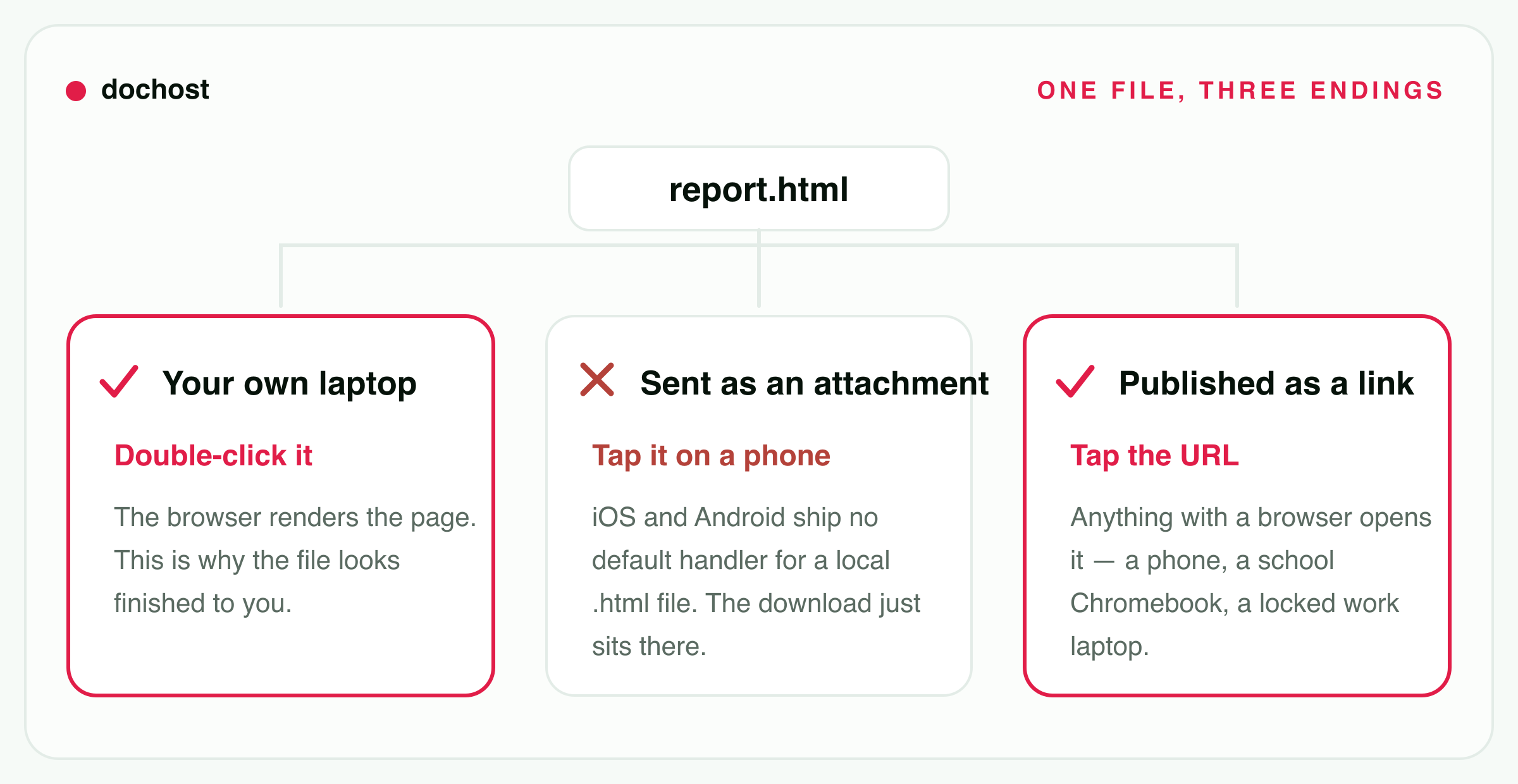
Most searches for an HTML viewer start the same way. The file looked fine on the computer that made it, and then someone else could not open it. The same report.html has three possible endings.
- On your own laptop, a double-click hands it to the browser, which renders it. That is why it looks finished to you.
- As an attachment opened on a phone, nothing renders. iOS and Android have no default app for a local
.htmlfile, so the download just sits there. - As a link, anything with a browser opens it: a phone, a school Chromebook, a locked-down work laptop.
The viewer above covers the first case on any machine, including one where you cannot install anything. For the other two, publish the file and send the link instead.
Conserva tus enlaces para siempre
Las páginas públicas gratuitas duran inicialmente 7 días y las privadas, 3 días. Los planes de pago permiten enlaces permanentes; durante la prueba se aplican otras reglas de caducidad.
Ver preciosCasos de uso relacionados
- Host the page instead of just viewing itFree HTML hosting — the same file at a URL other people can open.
- How to open an HTML fileIt opens on the computer you made it on and does nothing on a phone. Here is why, what works on each device, and the one route that works on all of them.
- HTML file to link converterUpload a .html file or paste the markup and get a clean, shareable URL in seconds — no server setup, no attachment headaches.
- Markdown preview you can shareRender your Markdown instantly and send a live link to teammates before anything goes live.
- Turn an HTML file into a live websiteHave an HTML file or a block of HTML? Turn it into a real website at a public URL in seconds — no hosting account, no domain, no deploy.
- HTML to image converter (PNG, JPG)Paste HTML or open a .html file. It renders with its own CSS and JavaScript, then downloads as a PNG or JPG at desktop, tablet or phone width. Nothing is uploaded.
- HTML formatter & beautifierPaste messy or minified HTML and get it back cleanly indented, with the CSS and JavaScript inside it formatted too — or minify it. Everything runs in your browser.
- JavaScript online compilerWrite JavaScript, run it in your browser, and share the result as a link. No sign-up, nothing to install.