How to Publish a Claude or ChatGPT Page in One Click With the Chrome Extension
The dochost extension adds a Publish button next to the HTML and Markdown your AI writes — including Claude's file cards. Here is the full flow, recorded in a real Claude chat, and what each option in the panel does.
Asking an AI for a web page and then getting that page to someone else is a copy-paste chore: copy the code, open dochost, paste, publish, copy the link, switch back. The Chrome extension removes the middle. When a Claude or ChatGPT answer contains publishable HTML or Markdown, a Publish button appears next to it; one click previews the page and a second click puts it online. This guide shows the flow in a real Claude chat.
Install
Add it from the Chrome Web Store via dochost.io/extension. It works in Chrome, Edge, Brave and Arc, and it only runs on the AI sites it supports — ChatGPT, Claude, Gemini, DeepSeek and Grok. No setup afterwards: it publishes anonymously out of the box, and you can sign in later to attach pages to your account.
Publish from a Claude chat
Ask Claude for a page as you normally would. When the answer arrives as a file card (Claude's default for HTML), the extension adds Publish right on the card, next to Download. For an inline code block it sits next to Copy.
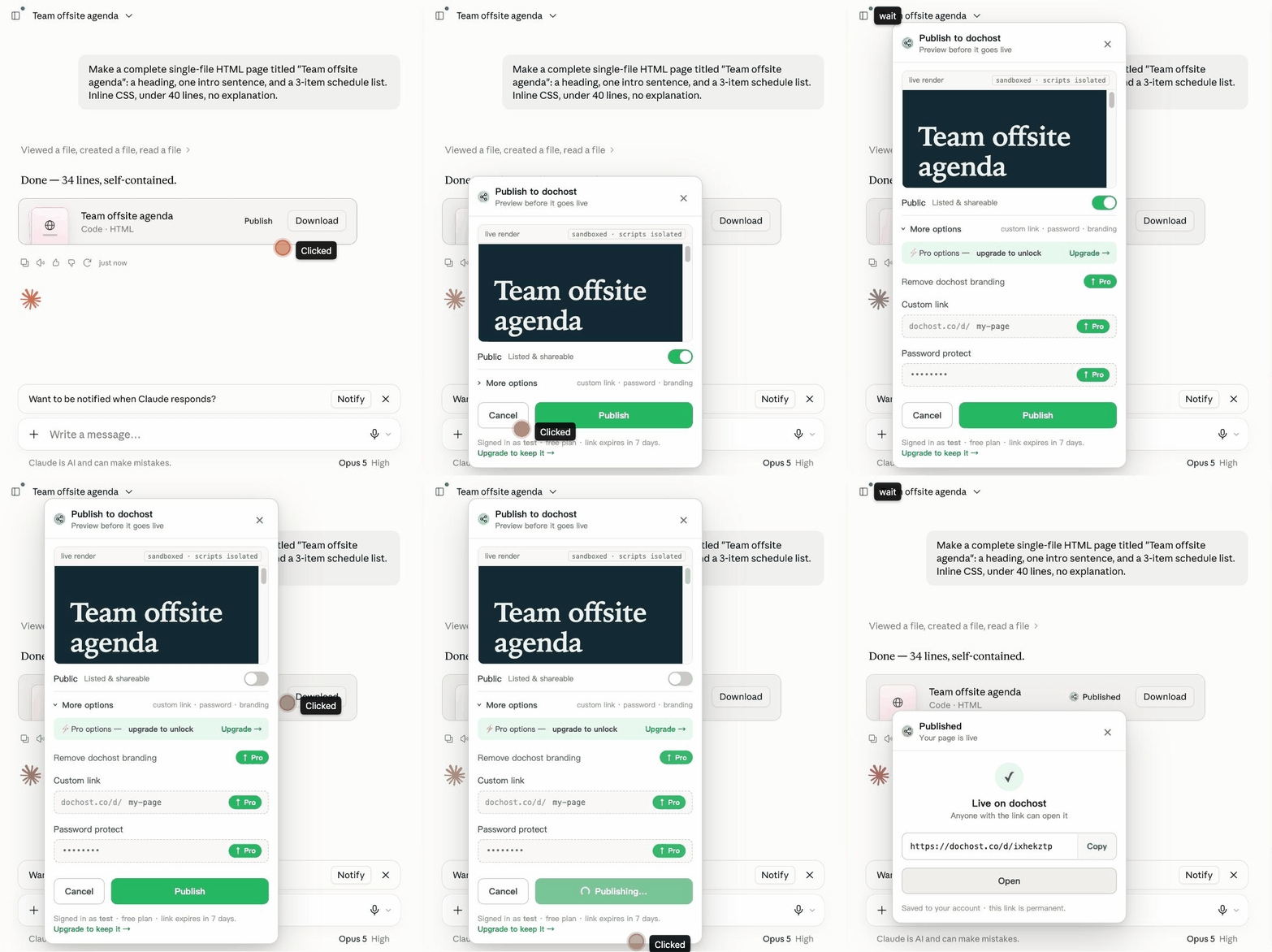
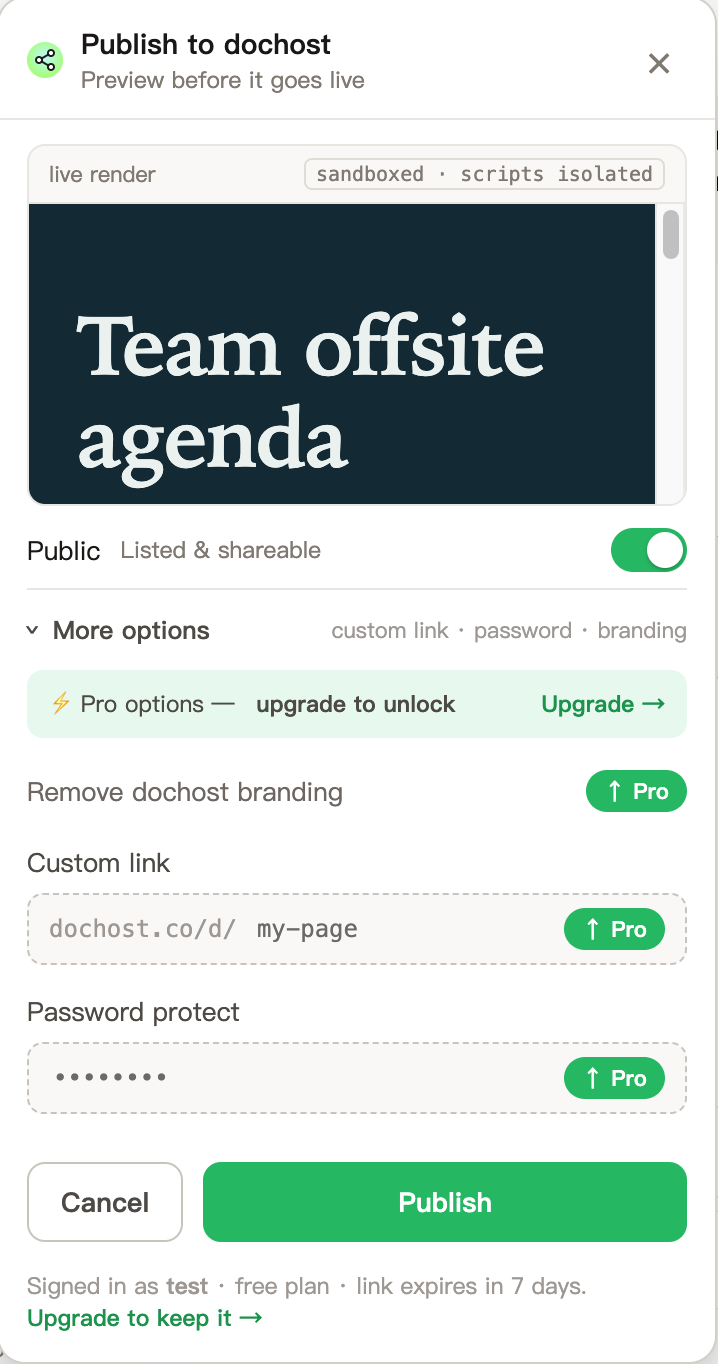
- Click Publish on the card. A panel opens with a live render of the page. Nothing has left your browser yet — the preview is sandboxed and scripts are isolated.
- Check the Public toggle. On by default, it lists the page on Explore where anyone can find it. Turn it off for a page meant for specific people; the link still works for anyone who has it.
- Open More options if you want a custom link, a password or no dochost branding. These are Pro features, and the panel says so on a free account.
- Click Publish in the panel.
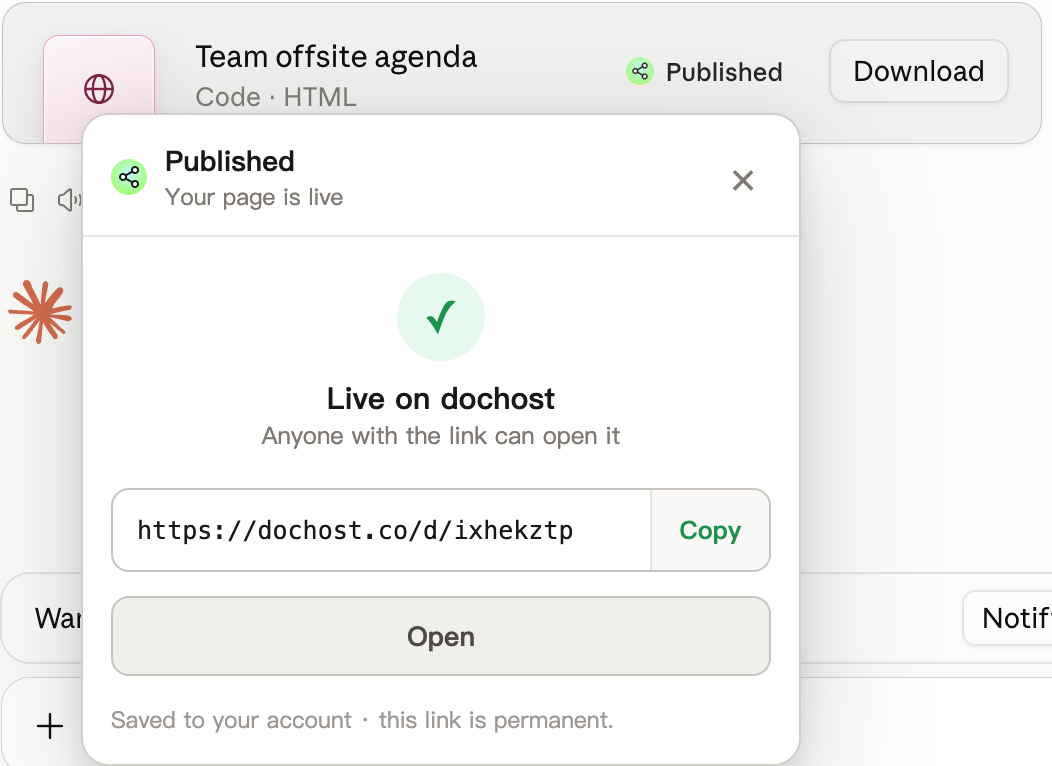
A few seconds later the panel turns into the result: the link, a Copy button and Open. The card's button now reads Published, so you can see at a glance which artifacts in a long chat already have a link.
The whole thing is about four clicks and never leaves the chat.
ChatGPT and the others
The same button appears in ChatGPT, on code blocks and on the file cards ChatGPT uses for generated files. Gemini, DeepSeek and Grok are supported through the generic code-block detector: any fenced HTML or Markdown block gets the button.
If you do not see it, the usual reasons are: the answer is prose rather than a code block or file; the page was still streaming when you looked (the button appears when the answer finishes); or the extension needs a refresh of the tab after an update.
Signed in or anonymous?
- Anonymous publishes are free and expire after 7 days, exactly like anonymous publishes on the site. The panel footer says which state you are in.
- Signed in, pages land in your dashboard, follow your plan (permanent links on Pro and Max), and the Pro options in More options become usable. Sign in once on dochost.io in the same browser; the extension picks it up.
Updating a page you published
Publishing the same artifact again creates a new link, which is rarely what you want. To change an existing page, open it from your dashboard (or from the edit link in the success panel on the site) and edit there — the URL stays the same. See Edit a Page You Already Published.
Privacy
The extension reads the page only to find publishable blocks and sends nothing until you click Publish in the panel. It never reads your conversations otherwise, and it has no access to your ChatGPT or Claude account. The full policy is at dochost.io/extension.
More Posts
CodePen vs dochost: Where Should AI-Generated HTML Live?
CodePen is an editor with a shareable result, while dochost turns finished HTML from ChatGPT or Claude into a clean link that opens as the page itself.

How to Share a Formatted Document Without Sending an Attachment
Attachments break formatting, trigger download warnings, and die on phones — here's how to put a Markdown or HTML document at a link instead.
PDF to Markdown, Word to Markdown, and Six More Converters That Run in Your Browser
A set of free document converters that do the work locally in the browser — no upload, no signup — and hand the result straight to a shareable link if you want one.
Newsletter
Join the community
Subscribe to our newsletter for the latest news and updates