How to Publish a README as a Webpage
Turn a README or any repo Markdown into a clean, shareable webpage in one paste — no repo access, no GitHub Pages setup, and no build step needed.
A README is written in Markdown because developers live in the repo. The problem is that plenty of the people who need to read it don't. A PM reviewing your architecture proposal, a client following your setup instructions, a contractor who needs the onboarding doc from a private repo — none of them want to clone anything, and some of them literally can't open the repo at all.
You have three usual escape hatches, all bad. Send the raw .md file and it opens as a wall of plain text with visible ## and |---| markup. Copy it into an email and every table and code block gets mangled. Grant repo access just so someone can read one document and you've handed over the entire codebase for a five-minute read.
The fix is simpler: publish the README as a standalone webpage and send a link.
The three-step version
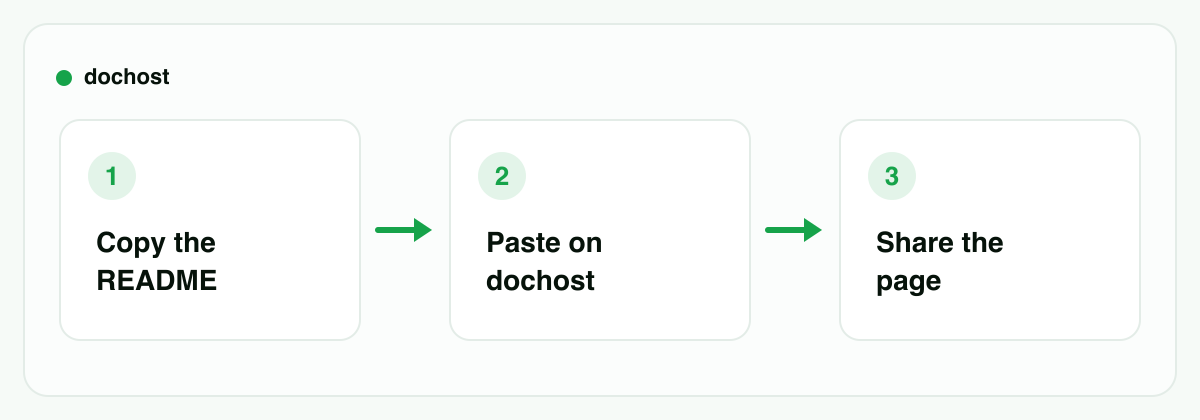
- Copy the Markdown. Open the README (or any
.mddoc) in your editor, select all, copy. If it's on GitHub, the raw view or the "Copy raw file" button in the file header works too. - Paste it into dochost. Drop the whole thing into the Markdown preview tool. You immediately see the rendered result — a themed, readable page, not raw text.
- Publish and share. Click publish, get a short link, paste it into Slack, an email, a ticket, wherever. The recipient clicks and reads. No account needed on either end.
That's the entire workflow. No repo config, no branch to push to, no static site generator, no waiting for a build.
What actually renders
The reason this works for READMEs specifically is that the rendering covers the stuff READMEs are made of:
- Headings become a proper visual hierarchy, so a long doc is scannable.
- Tables render as real tables — the thing email clients and chat apps destroy first.
- Fenced code blocks get syntax highlighting. Setup instructions with shell commands, config snippets, and example code stay readable and copy-pasteable.
- Task lists (
- [ ]/- [x]) show up as actual checkboxes, which matters for launch checklists and onboarding docs. - Mermaid diagrams and LaTeX math render too, if your doc goes beyond a plain README — architecture docs with a
mermaidblock just work.
One honest caveat: images referenced by repo-relative paths (./docs/screenshot.png) won't load, because that file only exists inside your repo. Anything referenced by a full URL — a raw GitHub URL for a public image, a badge from shields.io, an image host — loads fine. If your README leans on local screenshots, either swap those references to absolute URLs or accept that the published page shows the text without them.
If you'd rather paste before you copy — checking how something looks first — the flow is the same tool: preview left, rendered page right, publish when it looks right. And if you want the page as a file instead of a link, Markdown to HTML gets you a downloadable standalone HTML version of the same document.
The private repo problem
This is the case where "just look at it on GitHub" genuinely fails. GitHub renders READMEs beautifully — but only for people with access to the repository. If the repo is private, that rendered README is invisible to everyone else.
The situation comes up more than you'd think:
- A contractor or agency needs your setup guide or API conventions doc, but you're not adding an external account as a collaborator on your codebase for that.
- A stakeholder outside engineering — legal, a client, an exec — needs to read a proposal that happens to live in
docs/next to the code. - A candidate or vendor needs one document during a process where repo access is out of the question.
The GitHub-native answers are all heavyweight: add them as a collaborator (too much access), copy the doc into Google Docs (formatting drift, now you maintain two copies of record), or export a PDF (stale the moment you edit the source).
Publishing a copy as a webpage threads the needle: the reader gets a clean rendered page, and your repo stays sealed. The published page is a snapshot — it contains only the text you pasted, with no connection back to your repository. Worth being clear-eyed about the flip side too: the link is unlisted, not authenticated. Anyone who has the URL can open it. For most internal docs that's exactly the right level of friction; if the content is genuinely sensitive, paid plans add password protection on the link.
Lifespan works the same way as everything else on dochost: a free publish lives for 7 days (account or not), and paid plans make links permanent (plus custom slugs and removing the branding). For "read this before Thursday's meeting," the free link is usually all you need. For a doc you'll reference for months, put it on a paid plan.
When GitHub Pages or a real docs site is the better answer
Honesty section. A pasted page is the right tool for a document. It's the wrong tool for documentation.
Use GitHub Pages when the project is public and the docs should live with the code. Pages builds straight from your repo, updates on every push, and gives you a permanent username.github.io/project URL for free. Note the constraints: on the free plan the repo must be public, and Pages sites are publicly accessible on the internet even when built from a private repo (on plans that allow it) — so Pages doesn't solve the private-doc problem either, it just moves it.
Use a docs site (Docusaurus, MkDocs, Fumadocs, GitBook) when you have multi-page documentation. Navigation, search, versioning, cross-page links — a single published page can't and shouldn't replicate that. If your docs/ folder has fifteen files that reference each other, you want a docs site.
Use a paste-and-publish link when the unit is one document and the reader is outside the repo. One proposal, one setup guide, one runbook, one RFC. No pipeline to maintain, nothing to configure, and the reader needs zero context about where the file came from. (If the doc was drafted by ChatGPT or Claude rather than pulled from a repo, the browser extension collapses even the copy-paste step into one click.)
The dividing line is maintenance. GitHub Pages and docs sites earn their setup cost when docs change often and readers return often. A shared link wins when you need one document in front of one audience, now.
Bottom line: GitHub already renders your README perfectly — for people inside the repo. For everyone else, copy the Markdown, paste it and publish, and send the link. Save the docs-site machinery for actual multi-page documentation.
More Posts
How Long a Free dochost Link Lasts, and How to Extend It
Free pages expire after 7 days. Here is where that countdown shows up — success panel, reader footer, dashboard — and the three ways to keep a page online: a one-time extension, a like milestone, or a plan that makes every link permanent.

Edit a Page You Already Published — Without an Account
Published a page, then spotted a typo? dochost now gives you an edit link alongside the share link, so you can update the page in place and keep the URL.
How to Read Your dochost Page Analytics
Views and likes for every page, per-page daily charts, and an account-wide curve on Max. Here is where each number lives, how views are counted without any tracking script, and why the totals sometimes differ from Google Analytics.
Newsletter
Join the community
Subscribe to our newsletter for the latest news and updates