How Explore and Likes Work on dochost
Public pages appear on Explore, readers can like them from the corner pill, and 30 likes buy a free page another 30 days. Here is what gets listed, how the three sort orders are ranked, what a like counts, and how to keep a page off Explore without hiding the link.
Every publish panel has a Visibility choice — Private or Public on Explore — and every published page has a small heart in its corner. Together they are dochost's only social layer: a public listing of pages, and a like count that can extend a free page's life. This guide explains both, with the exact rules.
What Explore is
dochost.io/explore lists every page whose visibility is Public, with a thumbnail, the title, the format and the view and like counts. Anyone can browse it without an account, search by title or keyword, and filter to Markdown or HTML.
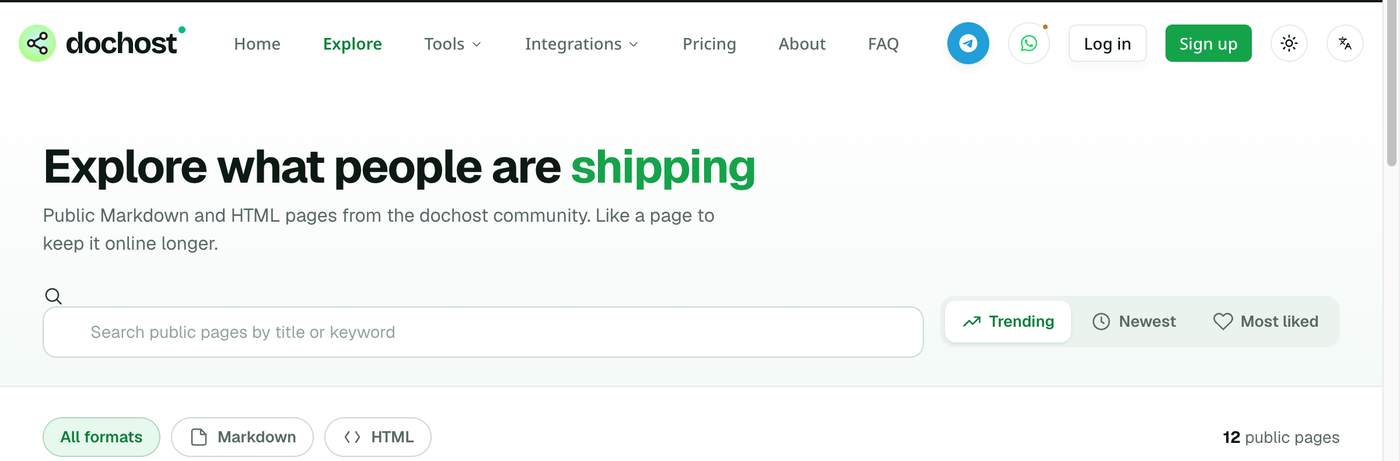
Three sort orders:
- Trending — pages getting views right now, so a new page that people are opening can outrank an old one with more total views.
- Newest — publish time, most recent first.
- Most liked — total likes.
Public is the recommended default on the publish panel because Explore is where a page can find readers who were not sent the link — and, in practice, where it collects enough likes to matter.
What Explore is not
- It is not search-engine indexing. A public page is still
noindexfor Google unless you also switch Search engines to Listed on the manage screen, which needs a permanent page. See How to Get a Page Indexed by Google. - It is not a feed you can post to. There is no profile page or follower list; a page appears because it is public, and disappears when it expires, is made private, or is deleted.
- It does not show password-protected pages, expired pages, or pages under moderation review.
Making a page private after the fact
Open the page in your dashboard and switch Visibility to Private. The page leaves Explore immediately; the link keeps working for everyone who has it, and existing views and likes are kept. Switching back re-lists it. Private pages published without an account also expire sooner — 3 days instead of 7 — which the publish panel notes next to the option.
How likes work
Every published page shows a pill in the bottom-right corner with views, likes and time left. Readers click the heart to like. The rules:
- One like per reader per page, enforced with a cookie in the reader's browser. Reloading and clicking again does not add a second like; clearing cookies does, which is the trade-off for not requiring an account.
- No account needed to like, on either side.
- Likes are counted on dochost's own server, the same way views are, so they are not affected by ad blockers.
Likes keep a free page alive
A free page expires after seven days. When it reaches 30 likes, dochost adds 30 days to its expiry — once per page, automatically, no upgrade required. The page's manage screen shows the progress under Engagement ("30 more likes unlock a free 30-day extension"), and the success panel mentions it right after publishing.
Some fine print:
- The extension is applied when the 30th like lands, and adds to whatever time is left at that moment. It does not fire a second time at 60.
- Pages on a Pro or Max account are already permanent, so likes on them are just likes.
- The heart is on every page, private ones included, so a link-only page shared in a group chat can reach 30 likes too. Public pages just have far more readers to get there.
Reporting and moderation
Every page's footer has Report this content. A report never removes a page by itself — that would hand anyone with a few IP addresses a button to take down a competitor. Instead the first report on a page re-runs dochost's phishing check on the page's own content: if the content is caught, the page is blocked automatically; if not, a person is notified with the reporter's words and decides. The safety check at publish time already keeps pages that link to malware or phishing off Explore entirely (see why a page can't be published). Like counts play no part in any of this, so a page with many likes is not protected from review, and a page with none is not suspect.
Getting a page noticed
There is no algorithm to game; Trending is views over the last little while. The pages that do well on Explore are the ones people actually send around — a quiz for a class, a fan page, a well-made single-page tool — and a clear title with a real thumbnail. The thumbnail is generated from the page itself, so a page whose first screen is a wall of unstyled text gets a thumbnail to match.
More Posts
How to Publish a Claude Artifact as a Standalone Webpage
Two ways to put a Claude artifact on a real URL — Claude's built-in Publish button, or pasting the code into dochost for a plain standalone link.

How to Share an HTML File as a Link (5 Ways, 2026)
Five practical ways to share an HTML file as a link in 2026 — paste HTML get link, host a single file, Netlify Drop, GitHub Pages, and email workarounds — with real dochost free limits.
CodePen vs dochost: Where Should AI-Generated HTML Live?
CodePen is an editor with a shareable result, while dochost turns finished HTML from ChatGPT or Claude into a clean link that opens as the page itself.
Newsletter
Join the community
Subscribe to our newsletter for the latest news and updates