How to Open an HTML File on Your Phone (iPhone and Android)
Someone sent you an .html file and you're on your phone. Here are the local options that half-work, and the one method that renders on any device.
Someone emailed you a report as an .html attachment. Or ChatGPT generated a little page for you and you saved it. Either way, the file is now on your phone, you tap it, and instead of a rendered page you get… a wall of raw code, a "no app can open this file" message, or a download that goes nowhere. Opening an HTML file on a phone is weirdly harder than opening a PDF, and the reason is simple: mobile browsers are built around URLs, not local files. Here's what actually works.
Why phones are bad at this
On a laptop, double-clicking an .html file opens it in your default browser. Done. Phones never got that convention. Mobile Safari and Chrome are designed to fetch pages from the network; neither ships an obvious "open a file from my device" button. File managers, meanwhile, treat .html as a document — sometimes they preview it, sometimes they show you the source code, sometimes they just offer to share it somewhere else.
So there are two families of solutions: fight the phone into rendering the file locally, or skip the fight and turn the file into a normal web link. Let's take them in that order.
Opening the file locally on an iPhone
On iOS, your .html file usually lands in the Files app (or arrives via Mail, Messages, or AirDrop).
- Tap it in Files. iOS uses Quick Look to preview documents, and what you get for HTML has varied across iOS versions — sometimes a rendered preview, sometimes plain source text. It's worth a tap, but don't be surprised if you see markup instead of a page.
- Try the share sheet. From the file's preview, tap share and look for Safari or a "copy to" option. There's no first-class "Open in Safari" for local files, which is most of the frustration.
- Use a third-party app. Document-viewer and code-editor apps on the App Store can open and render local HTML. This works, but you're installing an app to read one file.
Even when a local preview works, it renders a snapshot of the markup. JavaScript may not run the way it would in a real browser, and anything the file references by relative path won't load. A styled report will look roughly right; an interactive page often won't.
Opening the file locally on Android
Android gives you a bit more filesystem access, but Chrome doesn't make this easy either.
- Tap the file in your file manager (Files by Google or whatever your phone ships with). Some file managers hand HTML to the browser correctly; others open a stripped-down internal viewer or just show the source.
- The
file:///trick. You can type afile:///sdcard/...path into Chrome's address bar and, depending on the Android version and where the file lives, it may render. Modern Android's storage permissions make this less reliable than it used to be, and finding the exact path from a Downloads folder is nobody's idea of fun. - HTML viewer apps. The Play Store has plenty of dedicated HTML-viewer apps. They do render local files; quality varies, and many are ad-supported.
Same caveat as iOS: local rendering is a degraded version of the page. And if your real goal is to show the page to someone else, none of this helps — you'd be forwarding a file and making them repeat the whole dance.
The reliable way: turn the file into a link
The one thing every phone does perfectly is open a URL. So instead of forcing the phone to act like a desktop, put the file where browsers expect pages to live — on a web address.
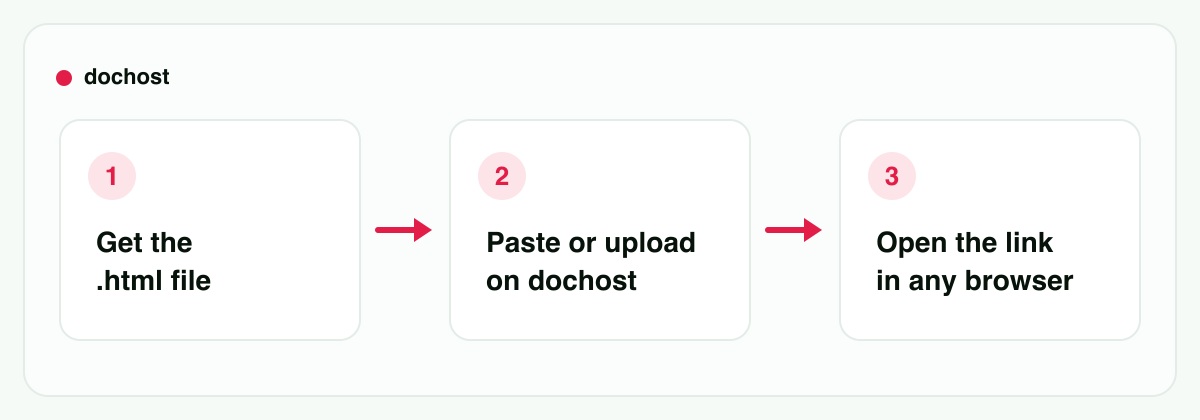
You don't need hosting or an account for this:
- Open dochost's HTML-to-URL tool in your phone's browser.
- Upload the
.htmlfile (or open the file's source, copy it, and paste the markup). - Check the live preview — it shows the page exactly as a browser renders it.
- Tap publish and you get a short link.
Open that link and the page just works: it's a real web page now, so CSS and JavaScript run as written, CDN-loaded fonts and libraries load, and interactive pages behave like they should — no viewer app, no file:/// archaeology. The whole thing takes under a minute, entirely on the phone.
Free links last 7 days (with or without an account), which covers the "I just need to read this thing someone sent me" case with room to spare, and paid plans make links permanent if the page needs to stick around.
The reverse problem: sending HTML to someone on a phone
Flip the situation: you made an HTML page — a report, a one-page site, something ChatGPT or Claude built for you — and the other person is on their phone. Now they inherit every problem in this post. An .html attachment on mobile is a coin flip between "renders fine" and "opens as code."
Send a link instead. Publish the file once, share the URL, and it opens identically on their iPhone, their Android, their laptop — anywhere. This is the same reason attachments are a bad way to share documents in general: a link renders; a file makes the recipient do the work.
If the HTML came out of an AI chat, you can shortcut even further: the dochost Chrome extension adds a one-click publish button inside ChatGPT and Claude, so the page becomes a link before it ever becomes a file on someone's phone. (There's a similar story for sharing ChatGPT-generated HTML without the extension, too.)
Not on a phone? The answer changes per device
A phone is the case people hit first, but it is not the only one: a managed
school Chromebook can refuse to open a local file outright, Windows will happily
hand .html to Notepad if the association got changed, and a locked-down work
laptop may allow nothing except visiting a web page. There is a device-by-device
version of this on how to open an HTML file, including what
the iOS Files preview does and does not render.
Which method should you use?
- You just want to glance at a simple file: try tapping it in Files (iPhone) or your file manager (Android). If you see rendered content, great, you're done.
- The page has styling, scripts, or interactivity: publish it to a link. Local viewers won't do it justice.
- You need to show it to anyone else: always the link. Forwarding an
.htmlfile to another phone user just relocates the problem. - You'll be doing this repeatedly (AI-generated pages, recurring reports): set up the one-click flow so files never pile up in your Downloads folder at all.
Bottom line: phones open URLs effortlessly and HTML files grudgingly. You can coax a local preview out of Files or a viewer app, but the dependable move is to turn the HTML file into a URL — it renders properly on your phone, and the link is ready to send onward instead of the file.
更多文章
How to Share Math Notes Online (With LaTeX Rendering)
Turn Markdown notes full of LaTeX equations into a clean, shareable web page — no Overleaf project, no PDF export, no screenshots of handwriting.

What Happens When a dochost Page Expires, and How to Bring It Back
After 7 days a free page shows an expired notice instead of the content. Nothing is deleted: the page, its URL, its views and likes are all kept. Here is what readers see, what the owner sees, and the three ways to put the same link back online.
How to Password-Protect a Page and Pick Its Link
Two Pro options on the publish panel — a custom link and a password — turn a random dochost URL into dochost.co/d/team-handbook that only people with the password can read. Here is the flow end to end, including what readers see.
邮件列表
加入我们的社区
订阅邮件列表,及时获取最新消息和更新