Logodochost
  • 首頁
  • 探索
  • 價格
  • 關於
  • 常見問題
Telegram
Logodochost

貼上 AI 生成的 Markdown 或 HTML,送出一個同事可以直接打開的乾淨連結。

支援信箱: admin@dochost.io免費開始
產品
  • Telegram 機器人
  • 瀏覽器擴充功能
  • 整合服務
  • 功能
  • 價格
  • MCP server
  • 常見問題
資源
  • 部落格
使用情境
  • PDF 轉 Markdown
  • Word 轉 Markdown
  • MD 轉 Word
  • CSV 轉 Markdown
  • Markdown 轉 Google 文件
  • Markdown 轉 Excel
  • Markdown 轉 HTML
  • HTML 轉 Markdown
  • 網頁轉 Markdown
  • Markdown 線上預覽
  • Markdown 格式化
  • Markdown 美化
  • 免費網頁空間
  • 分享 ChatGPT 產生的 HTML
  • 文字轉 Markdown
  • 所有線上工具
關於
  • 關於我們
  • 聯絡我們
  • 更新紀錄
法律
  • Cookie 政策
  • 隱私權政策
  • 服務條款
  • 退款政策
© 2026 dochost All Rights Reserved.
Featured on ToolDirsFazier badgeFeatured on Twelve ToolsFeatured on Twelve ToolsFeatured on Wired BusinessFeatured on Wired BusinessFeatured on toolfame.comFeatured on doforai.toolsMossAI ToolsFeatured on ufind.bestFeatured on aitoolfame.comFeatured on Findly.toolsFeatured on saasfame.comFeatured on Aura++Launched on 21st Tools

Turn an HTML file into a live website

Have an HTML file or a block of HTML? Turn it into a real website at a public URL in seconds — no hosting account, no domain, no deploy.

Paste or upload your HTML

Turn it into a live website at a public link — no domain, no host account, no deploy.

貼上你的 HTML 或 Markdown或把檔案拖到這裡 · 支援 .md 和 .html,最大 50 MB · 免費版 1 MB
顯示範圍

Going from index.html to an actual website usually means more work than the page itself took: pick a host, create an account, point a domain, set up FTP or a deploy pipeline, and wait for DNS. For a single page — a landing section, a one-pager, a styled report — that is wildly out of proportion. Pasting the HTML here, or uploading the .html file, turns it into a live website immediately: a real URL anyone can open in a browser, with the layout, fonts and inline styles exactly as you wrote them. There is nothing to install and no domain to buy. The page is served as static content, so it loads fast and works the same on a phone or a laptop — an html to website step that takes seconds instead of an afternoon.

How HTML to website works

  1. 1.

    Paste your HTML into the box above, or switch to upload and drop in your .html file. A full document with inline CSS works best.

  2. 2.

    Check the live preview — it renders the page the way a visitor will see it, so you can confirm the styling traveled with the markup.

  3. 3.

    Create the link. You get a public URL that serves your page as a live website; share it anywhere, on any device.

實際範例

A freelancer finishes a hand-coded HTML one-pager for a client pitch — a hero, three feature blocks, and a contact section, all styled with inline CSS in a single file. The client wants to “see it live,” not download a file and open it locally where half the team will forget how. Spinning up Netlify or buying a domain for a draft feels like overkill. The freelancer uploads the .html file here, the preview confirms the hero gradient and the button styles are intact, and they create a link. They send one line in the email: “Live preview here — flows top to bottom on mobile too.” The client opens it on their phone in the meeting, scrolls the whole thing, and approves the layout — all without the freelancer provisioning a host or touching DNS.

What do you mean by "website"?

The word covers everything from one page you need on a URL this afternoon to a multi-page site with a database. Here is honestly where the line falls between this page and a static host like Netlify or GitHub Pages.

  • One HTML page, live at a URL

    Both do it. dochost skips the account, the repository and the build step.

    dochost
    Yes
    A static host
    Yes
  • JavaScript that actually runs

    The published page runs its own scripts, so interactive pages stay interactive.

    dochost
    Yes
    A static host
    Yes
  • No account, live in seconds

    A static host wants a signup and usually a git repository first.

    dochost
    Yes
    A static host
    No
  • Multiple pages with /css and /images folders

    The uploader takes a single file — relative asset paths have nothing to resolve against. Inline the assets, or use a host built for directories.

    dochost
    No
    A static host
    Yes
  • Collecting what readers type in

    Neither one stores form data. Both can POST to an endpoint you own — see the guide on collecting form responses.

    dochost
    On paid plans, or with a caveat
    A static host
    On paid plans, or with a caveat
  • Your own domain name

    Available on dochost’s paid plans; standard and free on most static hosts.

    dochost
    On paid plans, or with a caveat
    A static host
    Yes
  • Still up in two years

    A free dochost link expires after seven days; paid plans keep it indefinitely. A static host keeps it as long as the account lives.

    dochost
    On paid plans, or with a caveat
    A static host
    Yes
What you needdochostA static host
One HTML page, live at a URLBoth do it. dochost skips the account, the repository and the build step.
JavaScript that actually runsThe published page runs its own scripts, so interactive pages stay interactive.
No account, live in secondsA static host wants a signup and usually a git repository first.
Multiple pages with /css and /images foldersThe uploader takes a single file — relative asset paths have nothing to resolve against. Inline the assets, or use a host built for directories.
Collecting what readers type inNeither one stores form data. Both can POST to an endpoint you own — see the guide on collecting form responses.
Your own domain nameAvailable on dochost’s paid plans; standard and free on most static hosts.
Still up in two yearsA free dochost link expires after seven days; paid plans keep it indefinitely. A static host keeps it as long as the account lives.

YesOn paid plans, or with a caveatNo

關於 HTML to website 的常見問題

Do I need a domain to turn HTML into a website?

No. You get a public dochost URL the moment you create the page, and it works immediately. If you later want a branded address, paid plans let you set a custom slug or your own subdomain, but it is never required to go live.

Will my CSS and layout survive?

Inline styles and <style> blocks render exactly as written, because they ship inside the HTML. CSS in a separate external file that is not included in the markup will not load — inline it (or use an absolute URL to the stylesheet) and the page is pixel-faithful.

Can I turn a multi-file site into a website here?

This is built for a single HTML page. If your site is one self-contained file with its CSS inlined, it works great. A multi-file project with separate local scripts, stylesheets and asset folders needs a full static host instead.

How long does the website stay online?

Free links last seven days (3 days if published as private) with a free account. On a paid plan every page you publish stays online permanently, so the URL keeps working as long as you want it to.

Is there a converter that turns HTML into a website automatically?

There is nothing to convert, and that is worth saying plainly because the word "converter" sets the wrong expectation. An HTML file is a web page already — the browser needs no conversion to read it. The only thing missing is an address, which is what hosting supplies. So a tool promising to "convert HTML to a website" is a hosting tool with a different label on it, and if one offers to restructure or rewrite your markup on the way through, that is a reason to be careful rather than a feature. We serve the file as you gave it to us.

Will my HTML website show up on Google?

Not on a free link, and that is deliberate. A free dochost page expires after seven days, so it is served with a noindex tag: letting Google index a page that is about to disappear would leave a dead search result behind it.

A page can be listed in search when all of these are true:

  • it is permanent — pages published on a paid plan never expire;
  • you set Search engines to Listed in that page’s settings. It is off by default, so nothing you publish ends up on Google by surprise;
  • it is public and has no password.

When a page qualifies, the noindex tag is gone the next time it is crawled. Google still decides when, and whether, to show it: a brand-new page with nothing linking to it can take days or weeks to be picked up.

If what you want is a free site that Google indexes, a static host on your own account — GitHub Pages or Cloudflare Pages, compared below — is the honest answer. Nothing expires there, so there is nothing to keep out of the index.
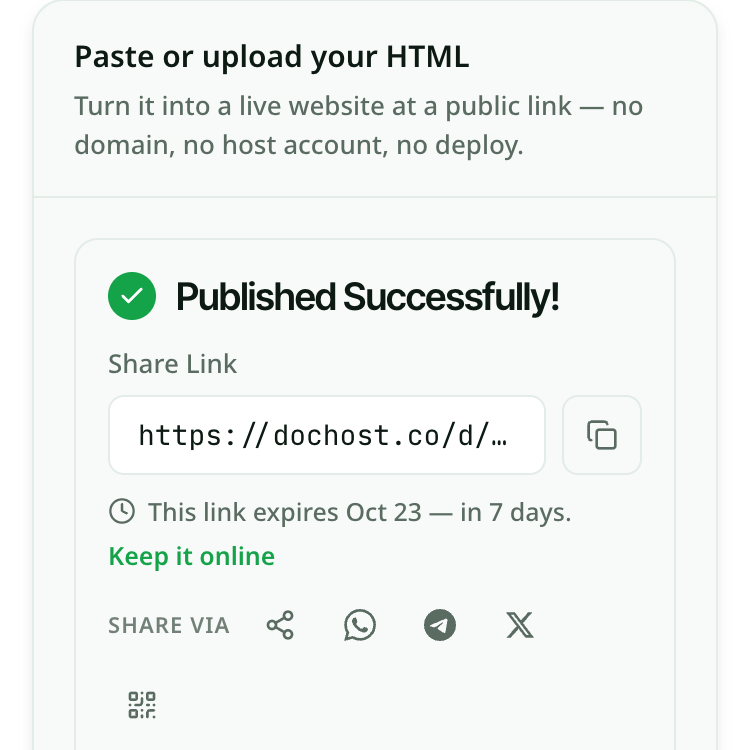
Turning HTML into a website from your phone

Everything above works the same on a phone, and the phone is where most people meet this problem: the HTML arrived in a chat or an email, or an AI assistant just wrote it.

  1. Copy the HTML. In ChatGPT or Claude, tap the copy button under the code block. If it is a file instead, save it to Files or Google Drive.
  2. Tap the box at the top of this page and long-press to paste. For a saved file, tap browse and pick the .html file.
  3. Tap Get my link. The link appears with a copy button and share buttons for WhatsApp, Telegram, X, your phone’s own share sheet and a QR code — so the page can go straight back into the chat it came from.

Open the link once on the phone before you send it. A page written for a laptop can look cramped at phone width; if it does, ask the assistant to make the layout responsive and paste the new version.

The dochost composer at phone width after publishing: a green check with “Published Successfully!”, the share link beginning https://dochost.co/d/ with a copy button, a note that the link expires in 7 days, and Share via buttons for the share sheet, WhatsApp, Telegram, X and a QR code.
A one-page HTML file published from a phone-width screen: the link, its expiry, and the share buttons.

Other ways to put an HTML file online

dochost is built for one page that needs a URL now. If your project is a folder of files, or you want it free and online indefinitely, one of these is the better tool. Every limit below comes from the provider’s own pricing or documentation page, checked on 16 October 2026.

dochost

Best for one file, live in seconds
Free tier
No account; links live 7 days
Paid from
Pro $7/mo — permanent links, custom slug, search listing

Paste the HTML or upload the .html file and a public URL comes back immediately, with its scripts still running. Nothing to configure and nothing to sign up for. One file per page, and a free link expires after seven days.

GitHub Pages

Best when the site already lives in git
Free tier
Free with a GitHub account; the repository must be public
Paid from
A paid GitHub plan for Pages from a private repository

Push the files to a repository, turn on Pages, and the site stays up for as long as the repository does. A published site can be up to 1 GB, with a soft limit of 100 GB of bandwidth a month. You need a GitHub account and a repository — a detour if you only want to send one page.

Netlify Drop

Best for a folder with CSS and images
Free tier
Free plan; you can drop before you have an account
Paid from
Paid plans for teams and larger projects

Drag a folder, a zip or a single HTML file onto app.netlify.com/drop and it is published with its relative /css and /images paths intact. Sign in first and it can even run a framework build for you. Dropped without an account, the link sits behind a temporary password until you claim it by signing up.

tiiny.host

Best for a single file you keep online
Free tier
1 active site, 3 MB uploads, 5,000 visits a month
Paid from
From $5/mo, billed yearly

Upload an HTML file, a zip or a PDF and get a link. Free links stay online indefinitely as long as you log into the account at least once every three months. One active site on the free plan, and it shows a Tiiny Host banner until you pay.

Cloudflare Pages

Best for many files on a free plan
Free tier
Up to 20,000 files per site, 500 builds a month
Paid from
Higher build limits on paid plans

Upload a folder in the Cloudflare dashboard — up to 1,000 files of 25 MiB each by drag and drop, more with the Wrangler CLI — and it is served from Cloudflare’s network. Needs a Cloudflare account, and the dashboard is built for developers rather than for sending one page.

讓你的連結永久保留

免費帳號的連結保留 7 天。升級付費方案後,你建立的每個頁面都會永久上線。

查看方案與價格

相關使用情境

  • Free HTML hosting for the finished pageWhere the file actually lives once it has become a website.
  • Free HTML hosting — get a live link without a hosting accountMost “free HTML hosting” means a signup form, FTP, and an ad banner on your page. For a single self-contained HTML file, you need none of that — paste or upload it and get a clean public URL in seconds.
  • HTML file to link converterUpload a .html file or paste the markup and get a clean, shareable URL in seconds — no server setup, no attachment headaches.
  • Publish an HTML website for free — get a link in secondsUpload your HTML file and get a shareable URL. No hosting account, no terminal, no configuration.
  • How to upload an HTML file to a website — no hosting account requiredDrop your .html file into dochost and get a shareable link in under a minute. No FTP client, no cPanel, no server setup.
  • dochost vs Tencent EdgeOne PagesDeploy-and-serve platform vs paste-a-page-to-a-link tool — which fits the job at hand?
  • Linktree alternatives: six ways to put your links on one pageFive of them are another hosted bio template. One is just a page you wrote, at a URL. Here is who each one actually suits — including the people who should stay on Linktree.
  • Iframe generator — build the embed code, then see if it worksSet the URL, size and behaviour, copy the tag. The preview tells you the thing most generators leave you to discover: whether that site allows being embedded at all.
  • Where to host a vibe-coded app when you just want the linkThe tool wrote the whole thing and now it wants a deploy pipeline. If the app is one self-contained file, paste it here and skip that part.
  • HTML viewer — paste it, see the pagePaste HTML or open a .html file and the rendered page appears next to the source, styles and scripts included. Nothing uploads until you decide to publish it.