ChatGPT to Word converter, with equations and tables intact
Paste a ChatGPT reply and download a real .docx: headings as Word headings, tables as Word tables, and every formula as a Word equation you can edit.
Equations become Word equations, tables become Word tables. Built in your browser.
Getting a ChatGPT answer into Word should be copy and paste. It rarely is. Click the Copy button under a reply and paste into Word, and you get the raw text ChatGPT wrote: ## in front of headings, ** around bold words, tables drawn with | pipes, and formulas as \(\frac{r}{n}\) — backslashes and braces instead of maths. Select the rendered answer with the mouse instead and the formulas come across as a jumble of characters.
This converter reads what the Copy button gives you and builds the Word document properly. Headings become Word’s own Heading styles, so the navigation pane and a table of contents work. Tables become Word tables. Lists keep their bullets and numbers. And each formula, inline or on its own line, becomes a native Word equation — the same object you get from Insert → Equation, which you can click into and edit. It works the same for Claude, Gemini and DeepSeek replies.
How to convert a ChatGPT reply to Word
- 1.
Copy the reply in ChatGPT. Use the Copy button under the answer, not a mouse selection — it copies the Markdown, equations included, exactly as ChatGPT wrote it.
- 2.
Paste it above. The preview renders it the way Word will: headings, tables, and formulas typeset. The summary counts what will become Word headings, tables and equations.
- 3.
Download the .docx. It opens in Word, Google Docs, Pages and LibreOffice. Formulas are editable Word equations; a matrix or aligned block, which Word equations cannot hold here, is kept as LaTeX text and the summary says so.
- 4.
Or publish it. If the reader only needs to read it, a link is quicker than an attachment — the same reply, rendered, at one address.
實際範例
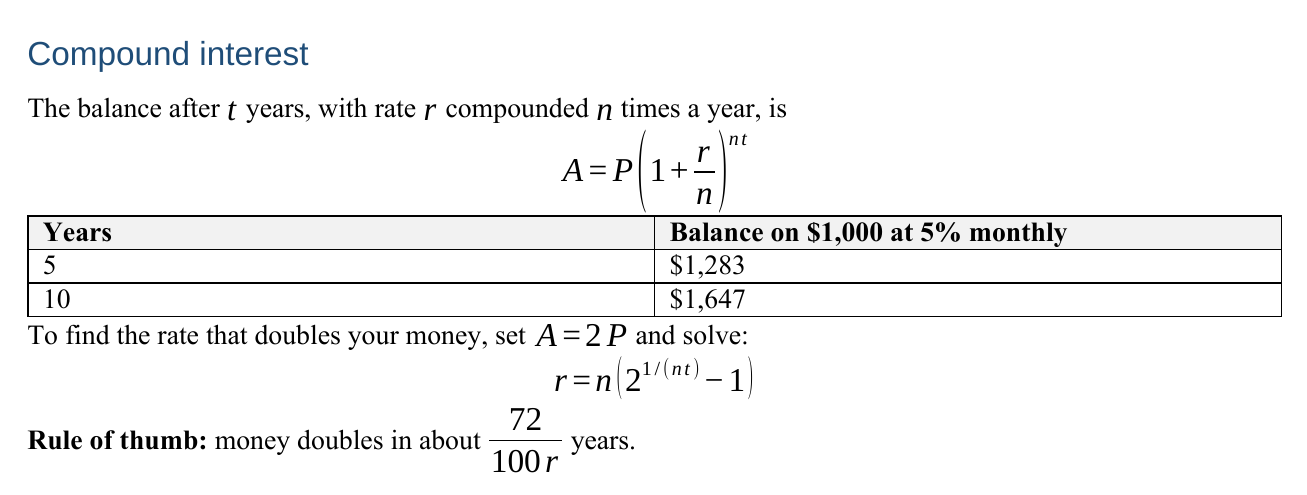
A finance student asks ChatGPT how compound interest works. The answer has a heading, the formula A = P(1 + r/n)^(nt) on its own line, a two-column table of balances, and a second formula for the rate that doubles your money. Pasted straight into Word, the formula arrives as \[A = P\left(1+\frac{r}{n}\right)^{nt}\].
They click Copy under the reply and paste it into the box above. The preview shows the fraction, the brackets and the exponent rendered properly, and the summary underneath reads “1 heading · 3 paragraphs · 1 table · 7 Word equations”. They press Download .docx and open the file. The heading sits in the navigation pane, the table has a shaded header row, and both display formulas are centred on their own lines.
Their tutor wants the rate written as a percentage. They click into the equation in Word and edit it there, which is only possible because it is an equation and not a picture of one.
Copy and paste into Word vs. this converter
Both start from ChatGPT’s Copy button. What differs is what arrives in Word.
Formulas like \(\frac{a}{b}\) and \[x^2\]
Native, editable Word equations. A pasted reply shows the LaTeX source.
- This converter
- Yes
- Paste into Word
- No
Tables
Word tables with a header row. A paste shows rows of | pipes.
- This converter
- Yes
- Paste into Word
- No
Headings
Word Heading 1–6 styles. A paste shows ## in front of the text.
- This converter
- Yes
- Paste into Word
- No
Bold, italic, links
Carried over as formatting. A paste shows ** and [text](url).
- This converter
- Yes
- Paste into Word
- No
Matrices and aligned equations
Kept as LaTeX text, and the summary tells you which ones.
- This converter
- As LaTeX text
- Paste into Word
- No
關於 ChatGPT to Word 的常見問題
How do I copy equations from ChatGPT to Word?
Click Copy under the reply, paste it here and download the .docx. Each \( … \) and \[ … \] formula becomes a native Word equation. Pasting the same text into Word directly leaves the LaTeX source, and selecting the rendered answer with the mouse scrambles it. Fractions, powers, roots, sums, integrals, brackets and Greek letters convert; matrices stay as LaTeX text.
Why can’t I copy text from ChatGPT to Word with the formatting?
ChatGPT writes Markdown, and Word does not read Markdown. The Copy button hands Word the raw text — ##, **, pipes — and Word shows it as typed. A mouse selection carries the web page’s formatting instead, which drops table structure and breaks equations. Converting the Markdown into a real document is the step in between, and that is what this page does.
How do I save a whole ChatGPT conversation as a Word document?
The Copy button copies one reply at a time, so paste the replies you need one after another — the converter takes as much text as you give it. For an archive of everything, ChatGPT’s Settings → Data controls → Export data emails you all your conversations.
Does it work for Claude, Gemini and DeepSeek?
Yes. They all write Markdown and use the same LaTeX for maths, whether with \( \) or $ delimiters, and both are recognised. A price like “$5 and $10” is left as text, not read as a formula.
Is my ChatGPT reply sent to a server when I convert it?
No. The Word file is built in your browser tab and downloaded from there. Nothing leaves your device unless you choose Publish. To clean up text rather than make a document, use the ChatGPT text cleaner.
讓你的連結永久保留
免費帳號的連結保留 7 天。升級付費方案後,你建立的每個頁面都會永久上線。
查看方案與價格相關使用情境
- Markdown to Word converterPaste Markdown, download a .docx — with real Word heading styles, so the navigation pane and table of contents actually work.
- ChatGPT text cleaner: remove hidden characters and MarkdownPaste what you copied from ChatGPT and see every odd space, zero-width character and stray asterisk marked — then copy clean text that pastes properly anywhere.
- Markdown to PDF — render it, then Save as PDFPaste your Markdown, preview the formatted result, and use Print → Save as PDF to get a clean PDF. Or publish it as a shareable link.
- Markdown to Google DocsPaste your Markdown here, hit copy, then paste into your doc — headings, lists, tables and links arrive formatted instead of as raw symbols.
- ChatGPT to PDF: save a reply as a clean, printable PDFPaste a ChatGPT answer, see it laid out on an A4 or Letter page — tables, code and formulas included — and save it as a PDF without the chat around it.
- ChatGPT LaTeX fixer: make ChatGPT math render in Obsidian and GitHubPaste a reply and every \( \) and \[ \] becomes $ and $$ — or the other way round. Each formula is checked, and the broken ones are flagged with the reason.