ChatGPT text cleaner: remove hidden characters and Markdown
Paste what you copied from ChatGPT and see every odd space, zero-width character and stray asterisk marked — then copy clean text that pastes properly anywhere.
Marks every hidden character before it goes. Runs in your browser — nothing is uploaded unless you publish.
Removes formatting residue, in your browser. It does not make text undetectable: AI detectors judge the wording, not these characters.
Text copied out of ChatGPT often misbehaves when it lands somewhere else. A LinkedIn post shows ** around the words that were meant to be bold. A form rejects a field that looks perfectly normal. A sentence refuses to wrap at the end of a line, or a search for a phrase you can see on the page finds nothing.
The cause is almost always one of three things. Markdown — ChatGPT writes **bold** and ## headings, and only a Markdown renderer knows to hide them. Odd spaces — a no-break space (U+00A0) or narrow no-break space (U+202F) looks exactly like a space but is a different character, so lines will not break there and searches do not match. Invisible characters — zero-width spaces and the citation marks some answers carry, which take up no room on screen at all.
This cleaner finds all three, marks each one where it sits so you can see what is about to change, and gives you text with only ordinary characters left. Each kind has its own switch. Dashes and curly quotes are left alone unless you turn that pass on, because they are usually wanted.
How the cleaner works
- 1.
Paste your text. Anything copied from ChatGPT, Claude, Gemini or DeepSeek — a reply, an email draft, a post. The switches show live counts of what they found.
- 2.
Press Clean text. The left pane changes from an editor to a marked view: odd spaces and invisible characters appear as small labelled chips, Markdown delimiters are struck through. Press Edit to go back.
- 3.
Choose what goes. Switch a pass off and its characters stay. Turn Markdown off to keep the formatting and use Copy formatted to paste bold and headings into Docs, Word or Gmail.
- 4.
Copy or publish. Copy clean text puts plain text on your clipboard. Publish as a link turns it into a page you can send. Cleaning itself happens in your browser; nothing is uploaded.
A real example
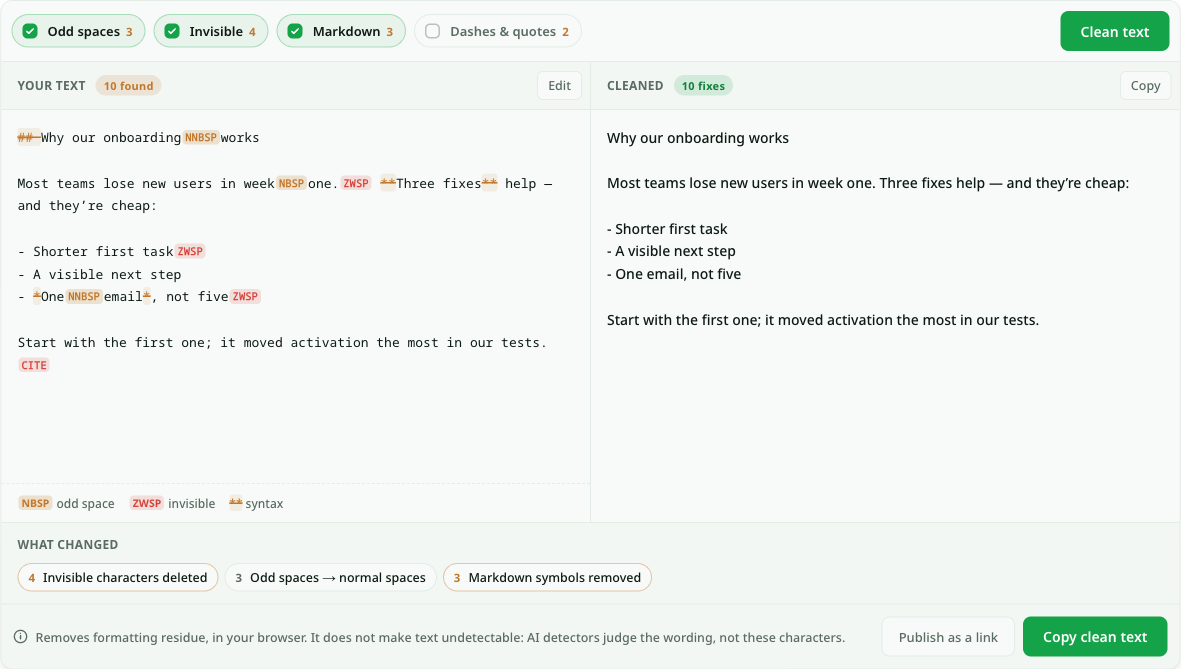
A product marketer asks ChatGPT for a short post about their onboarding changes, copies it with the Copy button, and pastes it into LinkedIn. The preview shows ## Why our onboarding works as the first line and **Three fixes** in the middle of a sentence. Worse, the line break after “week one” falls in an odd place on their phone.
They paste the same text here and press Clean text. The left pane now marks a NNBSP between “onboarding” and “works”, an NBSP between “week” and “one”, three ZWSP chips, a CITE chip where a citation mark sat, and the ##, ** and * delimiters struck through. The switches read Odd spaces 3, Invisible 4, Markdown 3. The right pane is the post as it should read: a plain first line, “Three fixes” without asterisks, and a list that keeps its dashes.
The ledger underneath says what happened: 4 invisible characters deleted, 3 odd spaces turned into normal spaces, 3 Markdown symbols removed. They press Copy clean text, paste into LinkedIn, and the post reads the way it did in the chat. The em dash in “help — and they’re cheap” is still there, because the dashes switch was off.
What gets cleaned, and what is left alone
Some characters that look like residue are doing real work. The cleaner only removes the ones that are not.
No-break space (U+00A0), narrow no-break space (U+202F), thin and hair spaces
Replaced with an ordinary space, so lines wrap and searches match.
- Removed or replaced
- Yes
- Switch
- Yes
Zero-width space (U+200B), word joiner, byte-order mark, soft hyphen
Deleted. They have no width and no meaning in pasted prose.
- Removed or replaced
- Yes
- Switch
- Yes
ChatGPT citation marks such as 【4†source】
Deleted with the invisible characters.
- Removed or replaced
- Yes
- Switch
- Yes
**bold**, ## headings, `code`, > quotes
Syntax removed, words kept. List dashes and numbers stay, so lists still read as lists.
- Removed or replaced
- Yes
- Switch
- Yes
Em dashes, curly quotes, the … character
Only when you switch the pass on. They are correct punctuation.
- Removed or replaced
- Optional
- Switch
- Yes
Zero-width joiner (U+200D) and non-joiner (U+200C)
Never removed: the joiner holds family and profession emoji together, the non-joiner shapes Persian, Arabic and Indic text.
- Removed or replaced
- No
- Switch
- No
Questions about ChatGPT text cleaner
Does ChatGPT put a hidden watermark in its text?
What people find when they go looking are ordinary Unicode characters: narrow no-break spaces, zero-width spaces, the odd citation mark. Those characters also turn up in text from word processors, websites and other chat tools, so they are not a signature of anything. This cleaner shows you exactly which ones your text contains and removes them.
Will cleaning my text make it undetectable by AI detectors?
No, and this tool does not try to. AI detectors judge the wording — sentence patterns, word choice — not invisible characters, so removing formatting residue does not change what a detector concludes. Use the cleaner because pasted text misbehaves, not to disguise where it came from.
Why are there asterisks when I paste from ChatGPT?
ChatGPT writes in Markdown, where **word** means bold. The chat window renders it, but a plain text field — LinkedIn, a form, an SMS — shows the asterisks as typed. Leave the Markdown switch on to remove them. If you want the bold kept, switch Markdown off and press Copy formatted, then paste into an editor that takes rich text, such as Google Docs or Gmail.
Why do I get weird spaces when I paste from ChatGPT?
Usually a no-break space (U+00A0) or a narrow no-break space (U+202F). They look like spaces but tell the layout never to break the line there, and a search for the two words separated by a normal space will not match. The Odd spaces pass replaces each one with a normal space; the marked view shows where they were.
Does it work for Claude, Gemini and DeepSeek output too?
Yes. The characters are the same whichever assistant produced the text, and so is the Markdown. For a whole reply you want as a document rather than as text, see ChatGPT to Word.
Keep your links forever
Free links last 7 days with a free account. On a paid plan every page you create stays online permanently.
See pricingRelated use cases
- Markdown to plain text converterPaste Markdown and get clean plain text: the asterisks and hash marks go, the link addresses, numbered steps and table columns stay.
- Markdown formatter — clean up messy Markdown in one clickPaste Markdown straight out of ChatGPT or Claude and get properly formatted source back: consistent list markers, aligned tables, no stray escape characters. Then publish it as a shareable link.
- Text to Markdown — paste formatted text, get clean MarkdownCopy out of Word, Google Docs, Notion or any web page. The headings, lists and tables come across as Markdown.
- Share ChatGPT HTML as a clean linkTurn the HTML ChatGPT writes for you into a real page your team or client can open — no hosting, no deploy, no copy-paste of code.
- ChatGPT to Word converter, with equations and tables intactPaste a ChatGPT reply and download a real .docx: headings as Word headings, tables as Word tables, and every formula as a Word equation you can edit.