"This page can't be published": what the safety check caught and how to fix it
dochost runs every link in a page through Google's Web Risk lists before it goes live. When one matches, publishing stops with a short notice and no URL named. Here is what the check looks at, how to find the link that tripped it, and what to change so the same page publishes a minute later.
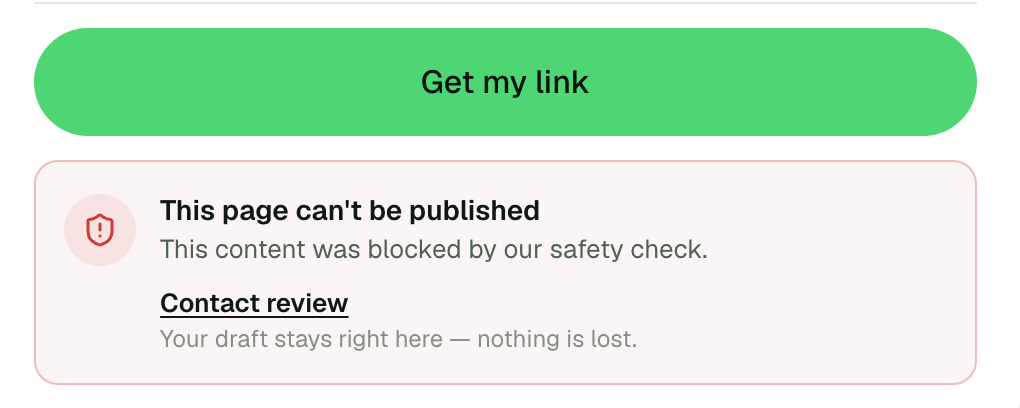
You paste a page, click Get my link, and instead of a link you get a red box: This page can't be published — This content was blocked by our safety check. Your draft is still in the editor, nothing was saved, and the notice does not say why. This guide explains what the check does, how to find the part of your page that triggered it, and what to change.
What the check actually does
Before a page goes live, dochost extracts every http:// and https:// URL a browser would fetch or navigate to from it, and asks Google Web Risk whether any of them is on the malware, social engineering (phishing) or unwanted software lists. One match anywhere in the page blocks the publish. Nothing else about the content is judged: no word filter, no AI review, no opinion about what the page is for.
"Every URL" is broader than the links you can click. The extractor follows the same rules a browser does, so it also sees:
srcon images, scripts, iframes, video and audio, plussrcsetandposteractionon formsurl(…)and@importinside<style>blocks and inline styles<meta http-equiv="refresh">targetshrefon SVG<use>and<image>elements- protocol-relative references like
//cdn.example.com/lib.js
Things that do not trigger it: mailto: and tel: links, data: images and fonts, javascript:void(0) placeholders, relative paths, and anything in plain text that is not an actual link. They used to; that gate was removed in August 2026 because it stopped legitimate pages far more often than bad ones.
A separate, narrower check blocks pages that combine a password field with a form posting to a known credential-harvesting destination. That one shows the same notice.
Finding the link
The notice does not yet tell you which URL matched, so you have to look. In practice the culprit is almost always one of these:
- A link the AI made up. ChatGPT and Claude invent plausible-looking CDN hosts, download mirrors and "official" sites. Some of those domains exist and are not friendly. Search your HTML for
httpand read every hostname. - A URL shortener.
bit.ly,t.co,tinyurland friends are checked against what they currently redirect to, and they share their reputation with whatever else was ever behind them. - A compromised site you did not write. A WordPress blog you linked six months ago can be hacked today. The link was fine when you added it.
- Copy-pasted embed code from a widget, a tracker or a "free counter" service.
- A download link for software, extensions or cracked tools. Those lists are aggressive about installers.
To confirm a suspect, paste the hostname into Google's Safe Browsing site status page. If it reports "unsafe", that is the one.
Fixing it
- Remove the link or replace it with the real destination. If you cannot verify a hostname, replace it with plain text.
- Self-host the asset. An image or script pulled from a dubious CDN can usually be inlined as a
data:URL or replaced with a well-known CDN like jsDelivr or unpkg. - Re-check
<style>blocks. Background images and imported fonts hide there and are easy to overlook. - Then click Get my link again. The check runs fresh each time; a page that publishes once is not marked in any way.
If the page is genuinely clean and still blocked — for example a link to your own domain that was flagged by mistake — click Contact review in the notice. A person looks at it, and false positives on Google's lists can be appealed from the Safe Browsing page above.
Why it is a hard stop
Pages on dochost run readers' browsers on a dochost.co address. A page that links a malware download or a phishing form puts every reader who trusts that address at risk, and gets the whole host flagged rather than the single page. Blocking at publish time — before anyone has the link — is cheaper for everyone than taking a page down after it has been shared, so the check is not something a plan or an account can switch off.
What it never does is edit your page. The draft stays exactly as you pasted it; the fix is always yours to make.
更多文章
How to Turn a Claude Artifact Into a PDF
Claude has no export-to-PDF button, and printing from the chat prints the conversation instead. Here's the route that actually produces a clean PDF of the artifact itself.

How to Publish a Page From Telegram With @dochost_bot
Send text, a .md file or an .html file to @dochost_bot and it replies with a public link. This guide covers what to send, what comes back, how to connect your account with /link so pages become permanent, and the few things the bot deliberately does not do.
How Long a Free dochost Link Lasts, and How to Extend It
Free pages expire after 7 days. Here is where that countdown shows up — success panel, reader footer, dashboard — and the three ways to keep a page online: a one-time extension, a like milestone, or a plan that makes every link permanent.
邮件列表
加入我们的社区
订阅邮件列表,及时获取最新消息和更新