How to Share a Formatted Document Without Sending an Attachment
Attachments break formatting, trigger download warnings, and die on phones — here's how to put a Markdown or HTML document at a link instead.
You wrote something with actual structure — headings, a table, some code blocks, maybe a styled layout — and now you need someone else to read it. The reflex is to attach a file. The problem is that attachments are where formatting goes to die, and the receiving end pays for it every time. There's a simpler move: put the document at a link and send the link.
Why attachments keep failing you
Each file format fails in its own way.
.html files are the worst offenders. Gmail and Outlook flag or outright block HTML attachments because they can contain scripts. Slack and WhatsApp will let the file through but won't render it — the recipient gets a download prompt for something their phone doesn't know how to open. And if your HTML references a stylesheet sitting next to it on your disk, it opens as an unstyled wall of text on theirs.
.docx files need the right app. On a machine with Word installed, fine. On a phone, or a Linux laptop, or in Google Docs' import view, your carefully spaced layout reflows, fonts substitute, and page breaks land somewhere new. There's also the "Protected View / Enable Editing" banner that greets every downloaded Word file — a speed bump that makes your document feel vaguely dangerous before anyone reads a word of it.
PDFs are the most reliable of the three, and they're still a chore on mobile: fixed page width means pinch-zooming and horizontal scrolling on a phone screen. They're also frozen — no working links between sections in most viewers, nothing interactive, and if you fix a typo you're re-sending the file and hoping nobody reads the stale copy.
Markdown files have the quietest failure mode: send someone a .md and a non-technical recipient sees raw ## and ** symbols in a text editor, wondering why your notes are full of punctuation.
The common thread: an attachment makes the recipient's software responsible for rendering your document, and you have no control over what that software is.
The alternative: a link that renders in the browser
A browser is the one renderer everybody has, on every device, already configured. If the document lives at a URL, "can you open this?" stops being a question. A plain link also travels everywhere an attachment struggles: it pastes into Slack, Teams, WhatsApp, a text message, or an email body without any file-size limit, virus scan, or blocked-extension policy getting in the way.
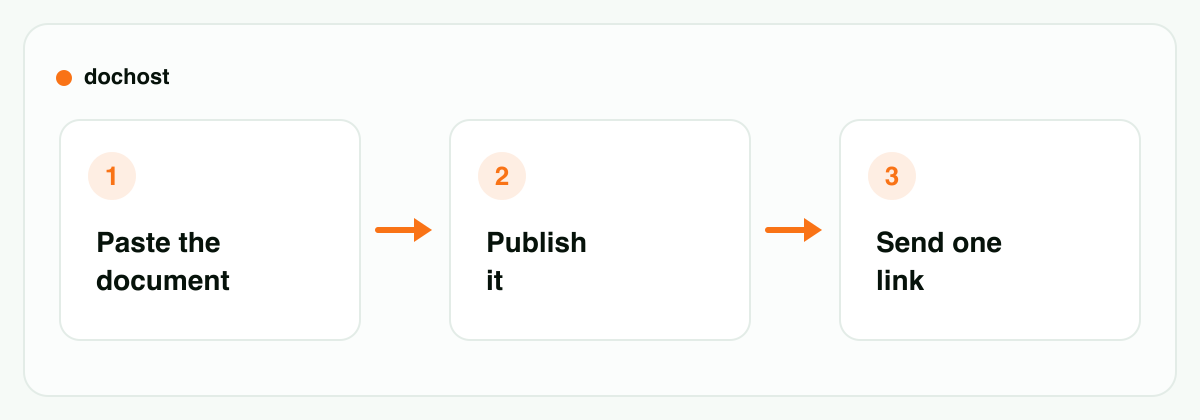
Here's how to get your document to a link with dochost, which takes pasted Markdown or HTML and publishes it as a live page. No account needed.
If you have Markdown
- Open the Markdown preview tool and paste your notes — or upload the
.mdfile. - Check the live preview. Markdown renders to a clean, readable themed page: headings, tables, task lists, and code blocks all come out properly formatted, and Mermaid diagrams and LaTeX math render too. This is the same content that looked like punctuation soup as a raw file.
- Click publish. You get a short link.
If you have HTML
- Paste the markup into the HTML to URL tool, or upload the
.htmlfile. - Confirm the preview. The page renders exactly as authored — inline CSS and JavaScript run as written, and CDN-referenced fonts and frameworks load. The only thing that won't work is a path that exists solely on your disk, which is exactly the thing that breaks when you email the file anyway.
- Publish, copy the link, done.
That last point matters more than it sounds: because scripts actually run, an interactive page — a quiz, a small dashboard, a demo — arrives working. No attachment format can do that.
If the document came out of ChatGPT or Claude in the first place, the Chrome extension collapses the whole flow into one click — a publish button appears right in the chat, no copy-paste.
What the receiver experiences
This is the real argument for links. With an attachment, the recipient downloads a file, dismisses a security prompt, waits for an app to launch, and maybe clicks through an "Enable Editing" banner. On a phone, several of those steps simply fail.
With a link: tap, read, done. The page opens in whatever browser they're already in, styled the way you wrote it, reflowing sensibly on a phone screen. No download folder cluttered with report-final-v3 (2).docx, no guessing which app opens it, no stale copy — with an account, you can update the page and everyone with the link sees the current version.
What you control as the sender
An attachment, once sent, is out of your hands forever — it sits in inboxes and download folders indefinitely. A link behaves differently, and mostly in your favor:
- Links expire on their own. On the free tier a page lasts 7 days, with or without an account. For a meeting brief or a draft for review, that's a feature: the document doesn't outlive its usefulness, and you didn't have to remember to clean anything up.
- Paid plans make links permanent — for documents that should stay up — and add password protection, so a sensitive doc is at least gated in a way a forwarded attachment never is. You also get a custom slug and can remove the branding. Details on the pricing page.
- One canonical copy. With an account, fix a typo and republish to the same page — there's no v2 to circulate.
When an attachment is actually the right call
Honesty section. Links don't win everything:
- Signatures. Contracts and anything needing a legally meaningful signature belong in a PDF flowing through a proper e-sign tool. A web page isn't a signable artifact.
- Files the receiver must edit. If the point is for them to open the document, change it, and send it back, they need the source file — a
.docxor a shared Google Doc, not a rendered page. - Compliance and archives. When a record must exist as a discrete file with a checksum in a retention system, a URL that can expire is precisely wrong. Send the file.
- Recipients with no reliable internet — printed handouts, offline field work — still want the self-contained file.
The pattern: attachments are for documents that are artifacts (signed, archived, edited). Links are for documents that are read.
Bottom line: if the goal is for someone to read a formatted document, stop making them download it. Paste the Markdown into the Markdown preview or the HTML into the HTML to URL tool, publish, and send one link that opens correctly on every device. Save attachments for the cases that genuinely need a file: signatures, edits, and archives.
Working inside Microsoft 365? How SharePoint's new HTML pages and the Embed web part compare to a public link, and which one reaches people outside your company, is in how to embed HTML in SharePoint.
更多文章
Turn Any AI Output Into a Shareable Link
Every AI tool leaves you with output trapped in a chat window. Here's the neutral step that turns it into one clean link for your team or client.

How to Claim a yourname.dochost.co Subdomain
Pro and Max accounts can serve every page from a short branded address like acme.dochost.co instead of dochost.co/d. Here is how to claim one, what happens to old links, and why renaming needs a second click.
How to Share the HTML ChatGPT Writes (Without Saving a File)
ChatGPT writes you a full HTML page, but it's stuck in the chat as code. Here's how to turn it into a link your team or client can open.
電子報
加入我們的社群
訂閱電子報,第一時間掌握最新消息與更新