How to Get a Published dochost Page Indexed by Google
Published pages are noindex by default. Flip one switch on the manage screen and a permanent, public page becomes indexable, joins the sitemap, and can rank under its own title. Here are the five conditions, why free pages are excluded, and how to check the result.
By default a dochost page tells search engines to stay away: every /d/{slug} is served with <meta name="robots" content="noindex, follow">. That is the right default for a link you send to five people. It is the wrong default for a public résumé, a product one-pager or a class syllabus you would like people to find by searching. This guide shows the switch, the conditions behind it, and how to verify it took.
The switch
Open the page in your dashboard and scroll to Page settings → Search engines. It has two positions, Listed and Hidden, and starts on Hidden. Click Listed.
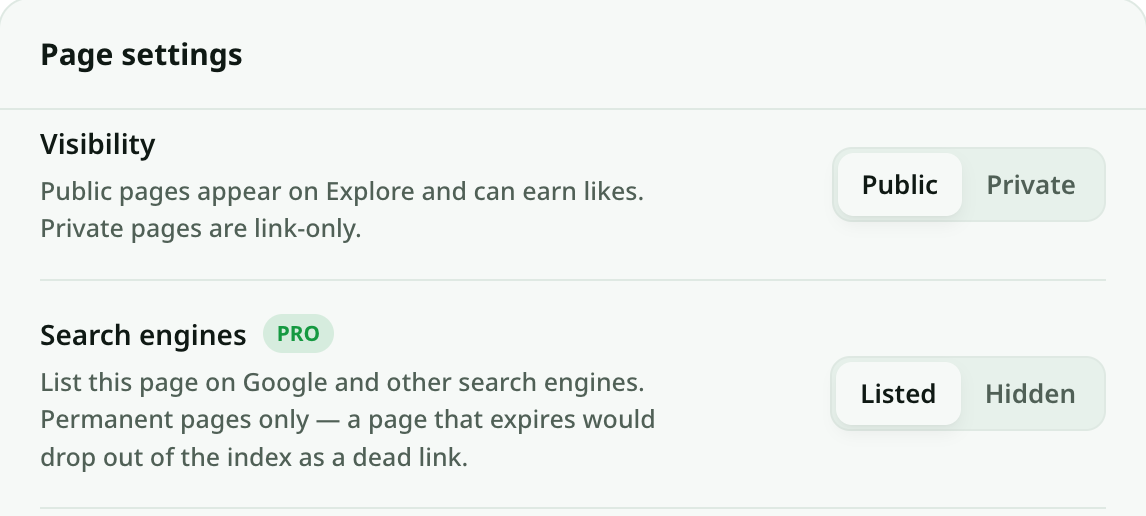
That is the entire UI. Behind it, five conditions all have to hold before the page's robots tag flips to index, follow:
| Condition | Why |
|---|---|
| The page is live | Expired, reported and pending pages are never indexed |
| The page is permanent | A page with an expiry date would become a dead link in Google's index; see below |
| Search engines is set to Listed | Explicit opt-in — nothing gets indexed by accident |
| Visibility is Public | Unlisting a page from Explore also unlists it from search |
| The page has no password | A protected page's title and text must not appear in results |
The first two are checked on every request, so a page that later expires, gets reported, or loses its permanence drops back to noindex on the next crawl without anyone doing anything.
Why free pages cannot be indexed
Free and anonymous pages live for seven days. If Google indexed one, it would crawl it, rank it, and then find an expired shell a week later — a soft 404 that counts against the whole domain, for a page that was only ever meant to live a week. So permanence is a hard requirement, and permanence is a paid capability: a Pro or Max subscription makes every page permanent, and the one-time Permanent (this page) option on the extend screen makes a single page permanent. Either satisfies the condition.
A page on a Pro trial is not permanent yet — its expiry moves to the end of the trial — so it stays out of the index until the subscription is active.
Checking that it worked
Right after switching, open the share link and view the source (Ctrl-U / Cmd-Option-U). Look for the robots tag in <head>:
<meta name="robots" content="index, follow"/>If it still says noindex, one of the five conditions is not met; the most common miss is a page that is public and listed but still on a free expiry.
Indexable pages are also included in the published-pages sitemap at dochost.co/sitemap-pages.xml, which search engines already read. You do not need to submit anything, and you cannot add the page to your own Search Console property because the host is dochost's. Indexing itself takes days to weeks and is entirely up to the search engine; a page with a clear title and real content in it does much better than a page whose only text is inside images.
Explore is not the same thing
Visibility → Public puts the page on dochost's own Explore listing, where other dochost users browse and like pages. Search engines → Listed is about Google, Bing and the rest. A page can be on Explore and hidden from search (the default for every public page), and it must be on Explore to be searchable — the two switches are related, not identical. How Explore and Likes Work covers the first one.
What is worth indexing
Because the switch is per page, you can be selective. Good candidates are pages that answer a question someone would type: a résumé under your name, a course outline, a product's install guide, a public changelog. Poor candidates are pages that only make sense to people who already have the link — meeting notes, drafts, anything with a date in the title that will be stale next month. Those are better left Hidden, where the link still works for everyone you sent it to.
Titles matter here: the page's <title> (for HTML) or first heading (for Markdown) is what appears in results, so make it say what the page is rather than "Untitled" or "index".
更多文章
How to Serve Your dochost Pages From Your Own Domain
Connect a subdomain you own, like docs.yourcompany.com, to your dochost account in three steps — one form, one CNAME record, one email. With screenshots, including the single Cloudflare setting that trips most people up.

How to Publish a Claude or ChatGPT Page in One Click With the Chrome Extension
The dochost extension adds a Publish button next to the HTML and Markdown your AI writes — including Claude's file cards. Here is the full flow, recorded in a real Claude chat, and what each option in the panel does.
Pastebin vs dochost: Raw Text vs a Rendered Page
When Pastebin's monospace raw text is the right call, and when you actually want your Markdown or HTML rendered as a real page at a shareable link.
邮件列表
加入我们的社区
订阅邮件列表,及时获取最新消息和更新