ChatGPT LaTeX fixer: make ChatGPT math render in Obsidian and GitHub
Paste a reply and every \( \) and \[ \] becomes $ and $$ — or the other way round. Each formula is checked, and the broken ones are flagged with the reason.
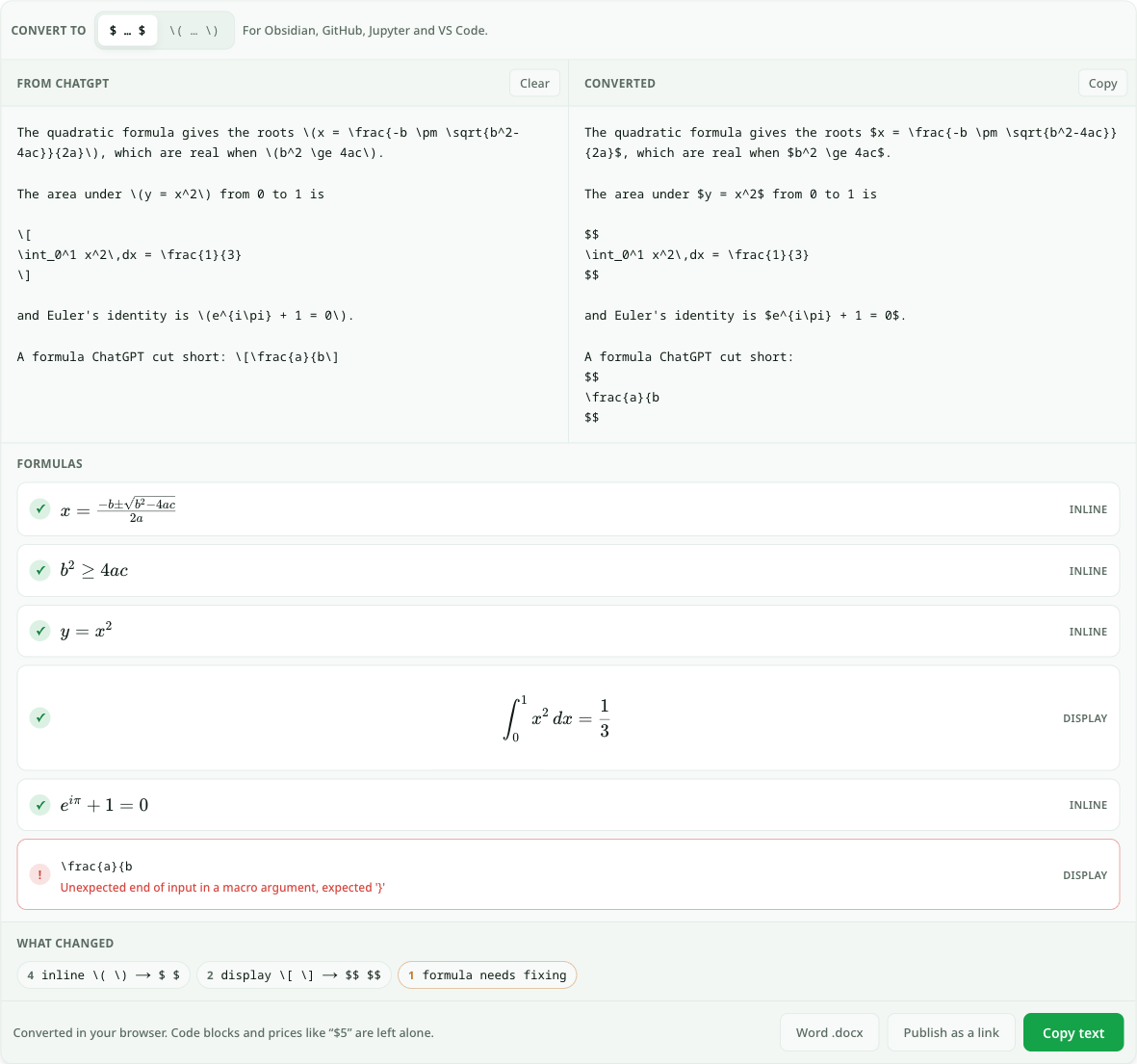
Every \( \) and \[ \] converted, every formula checked. Runs in your browser.
- Renders, inline
- Renders, inline
- Renders, inline
- Renders, display
- Renders, inline
- Needs fixing, display
\frac{a}{bUnexpected end of input in a macro argument, expected '}'
What changed
- 4inline \( \) → $ $
- 2display \[ \] → $$ $$
- 1formula needs fixing
Converted in your browser. Code blocks and prices like “$5” are left alone.
Copy a maths answer out of ChatGPT and paste it into Obsidian, a GitHub README or a Jupyter notebook, and the formulas do not render. You see \(x^2\) instead of x². The reason is a delimiter mismatch, not broken LaTeX: ChatGPT wraps inline maths in \( … \) and display maths in \[ … \], while most Markdown tools only look for $ … $ and $$ … $$. The formula inside is fine.
This fixer rewrites the delimiters and nothing else. Inline formulas get single dollars, display formulas get $$ on their own lines, and code blocks and prices such as “$5” are left exactly as they were. Switch the target to \( … \) to go the other way, for a LaTeX document or Overleaf. Every formula is also rendered in a list underneath. If ChatGPT cut one short or left a brace open, it is flagged in red with what is wrong, so you fix it before pasting.
How the LaTeX fixer works
- 1.
Paste the reply. Copy it with ChatGPT’s Copy button so the LaTeX comes across as written. Formulas are found wherever they are — inline, on their own lines, in lists and tables.
- 2.
Pick the target.
$ … $for Obsidian, GitHub, Jupyter and VS Code.\( … \)for LaTeX documents and Overleaf. - 3.
Check the list. Each formula is rendered with KaTeX. A red flag means it will not render anywhere until it is fixed, and says why — usually an unclosed brace or an unknown command.
- 4.
Copy, download or publish. Copy the converted text, download a .docx with real Word equations, or publish a page with every formula typeset.
A real example
A maths student keeps lecture notes in Obsidian and asks ChatGPT to explain the quadratic formula. The answer has four inline formulas and a display integral, all in ChatGPT’s \( and \[ style. Pasted into a note, they show up as raw backslashes.
They paste the reply above with selected. The converted text on the right reads $x = \frac{-b \pm \sqrt{b^2-4ac}}{2a}$, and the integral now sits between $$ lines. In the formula list, five formulas render with a tick. The sixth, \frac{a}{b, has a red flag: “Unexpected end of input in a macro argument, expected '}'” — ChatGPT stopped mid-formula and never closed the denominator.
They add the missing brace in the left pane, the flag turns into a tick, and they press Copy text. Pasted into Obsidian, every formula renders. For a printed handout, Word .docx turns the same text into a document with native Word equations.
Questions about ChatGPT LaTeX
Why doesn’t ChatGPT’s LaTeX render in Obsidian?
Obsidian renders maths between $ (inline) and $$ (display), and ChatGPT writes \( … \) and \[ … \] instead. The LaTeX inside is usually fine; only the wrapping differs. Converting the delimiters to $ makes it render. GitHub, Jupyter and VS Code’s Markdown preview follow the same $ convention.
Can I make ChatGPT use dollar signs in the first place?
You can ask it to (“write maths with $ and $$ delimiters”), and it often will for a while. It tends to drift back to \( in long answers, which is why fixing the text afterwards is more reliable than fixing the prompt.
What does a red flag on a formula mean?
The formula does not parse, so it would not render in any tool. The message says why: “expected '}'” means a brace was opened and never closed, and “Undefined control sequence” means a command KaTeX does not know, often a typo. Fix it in the left pane and the list updates as you type.
Will it change dollar amounts or code?
No. A single $ only counts as maths when it hugs the formula on both sides and is not followed by a digit, so “10” stays as prices. Anything inside backticks or a fenced code block is never touched.
How do I get ChatGPT equations into Word instead?
Press Word .docx here, or use ChatGPT to Word for a whole reply. Both turn each formula into a native Word equation that you can click into and edit, not an image.
Keep your links forever
Free links last 7 days with a free account. On a paid plan every page you create stays online permanently.
See pricingRelated use cases
- LaTeX viewer — render an equation, share the linkType a LaTeX math expression and see it rendered instantly. When it looks right, publish it as a clean, shareable page.
- ChatGPT to Word converter, with equations and tables intactPaste a ChatGPT reply and download a real .docx: headings as Word headings, tables as Word tables, and every formula as a Word equation you can edit.
- ChatGPT to PDF: save a reply as a clean, printable PDFPaste a ChatGPT answer, see it laid out on an A4 or Letter page — tables, code and formulas included — and save it as a PDF without the chat around it.
- Markdown preview you can shareRender your Markdown instantly and send a live link to teammates before anything goes live.