GitHub Gist vs dochost for Sharing Rendered Markdown
Gist is great for code snippets, but it wraps your Markdown in GitHub chrome and won't render HTML at all — when a clean standalone page is the better send.
If you're a developer, "put this Markdown somewhere shareable" has one reflex answer: make a Gist. It's fast, it's free, it's attached to the GitHub account you already have open in another tab. For sharing with other developers, that reflex is usually right.
But try the same move for a different job — sending a readable document to someone who just needs to read it. A project brief for a client. A report your AI assistant wrote. An HTML page with actual styling. Suddenly Gist's developer DNA works against you: your reader gets a document embedded in GitHub's interface, complete with file lists, revision counters, and fork buttons they'll never use. And if the file is HTML rather than Markdown, they don't get a page at all — they get source code.
That's the comparison worth making. Not "which tool is better," but which one fits the send.
What a Gist actually is
A Gist isn't a pastebin — it's a full Git repository with a web view. That's its superpower and its overhead at the same time. Every gist can be forked, cloned, and diffed across its complete commit history. People can leave comments under it, same style as GitHub issues. You can pin your best gists to your profile, and public gists are searchable and show up in GitHub's Discover feed.
Two things follow from that design:
You need a GitHub account to create one. GitHub removed anonymous gist creation back in 2018 (spam, mostly). Reading a public gist requires nothing, but publishing does — a non-issue for you, worth knowing if you're walking a non-developer colleague through sharing something themselves.
"Secret" doesn't mean private. A secret gist is just unlisted: it won't appear in search or Discover, but anyone who has the URL can open it. That's actually the same trust model most link-sharing tools use — just don't mistake it for access control.
Gists also don't expire. As long as your account exists, the link keeps working, which makes Gist a genuinely good home for long-lived reference material.
How your Markdown looks in a Gist
Name the file with a .md extension and GitHub renders it: headings, tables, code blocks, task lists, the works. GitHub's Markdown rendering is excellent — it's the dialect half the world writes in.
The catch is where it renders. Your document appears inside gist.github.com's interface: GitHub header on top, the file name bar, the Raw button, revision info, the comment section below. If your gist has multiple files, they all stack on one page. For a developer audience this is invisible — it's water to a fish. For a client reading your proposal, it's noise, and it makes the document read as "some code thing" rather than a finished piece of writing.
There's no way to get a chrome-free, standalone reading view out of Gist itself. What you author is a file in a repo; what your reader gets is that repo's web page.
The HTML wall
Here's the sharper limitation. Put an HTML file in a gist and GitHub shows the source — syntax-highlighted markup, not a rendered page. Click Raw and you still don't get a page: GitHub serves raw gist files with a plain-text content type precisely so browsers display them as text instead of executing them. That's a sensible security decision on GitHub's part, and it means Gist structurally cannot host a viewable HTML page.
The workarounds are third-party wrapper services — gistpreview.github.io, htmlpreview.github.io and similar — where you prepend a proxy URL to your raw gist link. They exist, they work for simple pages, but now your "share a link" flow depends on an unofficial service sitting between GitHub and your reader, and the URL you send is a nested monstrosity. For a one-off demo among developers, fine. For sending a styled report to a client, it's the wrong shape entirely.
The same job on dochost
dochost is built for exactly the send Gist isn't: paste Markdown or HTML, see a live preview, click publish, get a short link to a standalone page. No account needed.
Markdown comes out as a clean themed document — headings, tables, code blocks with highlighting, task lists, plus Mermaid diagrams and LaTeX math. You can preview the Markdown before publishing. The reader sees a document, not a repository.
HTML just works as a page. Inline CSS applies, JavaScript runs, CDN-loaded fonts and frameworks load. The interactive dashboard or quiz that Gist would show as angle brackets opens as the thing itself when you turn the HTML into a URL.
The trade-off runs the other way on lifespan: free links last 7 days (account or not), and permanence is a paid feature (along with custom slugs and password protection). Gist gives you forever for free — if forever inside GitHub's UI is what you want.
One workflow note: a lot of the Markdown and HTML worth sharing now comes straight out of ChatGPT or Claude, and the traditional path was "copy → new gist → paste → send the GitHub link." There's a Chrome extension that collapses that into one click inside the chat, publishing straight to a rendered page.
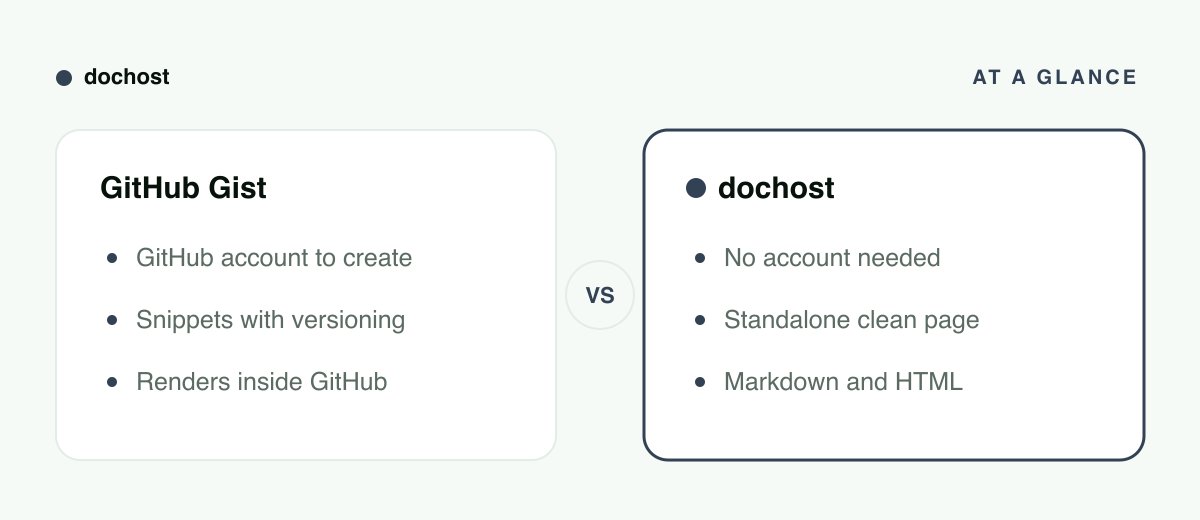
At a glance
| GitHub Gist | dochost | |
|---|---|---|
| Built for | Snippets, notes and files for developers | Documents someone should just read |
| Account to publish | GitHub account required | No |
| Markdown | Rendered, inside GitHub's UI | Rendered as a standalone clean page |
| HTML | Source view only; raw serves as plain text | Runs live, CSS + JS included |
| Versioning | Full Git history, forks, diffs | No version history |
| Comments | Yes, issue-style | No |
| Link lifespan | Doesn't expire | 7 days free, permanent on paid |
Choosing between them
Use Gist when the audience is developers and the content benefits from being a repo: code snippets people will copy or fork, a config or dotfile you'll revise over time (the diff history is genuinely valuable), notes you want commentable, anything you'd like discoverable next to your GitHub profile. Inside the GitHub ecosystem, Gist is the native answer and nothing else comes close.
Use dochost when the deliverable is a page: a report, a proposal, an AI-generated writeup, anything with HTML and styling, anything going to a reader who shouldn't have to know what a fork is. Also when the author can't or won't create a GitHub account.
A simple test: if the person receiving the link would ever click "Raw" or "Fork," send a Gist. If they'd just read and scroll, send them a page.
Bottom line: Gist is a Git repo with a web view — perfect for versioned snippets shared between developers, wrong for handing someone a finished document, and incapable of serving HTML as a page. When the job is "make this readable at a link," paste it into dochost and send the rendered thing.
更多文章
Notion Public Pages vs dochost: Sharing a Doc Outside Your Workspace
Notion can publish any page to the web — but for a one-off doc share, compare setup, load speed, Markdown import, raw HTML, and link lifespan with dochost.

Can You Share a ChatGPT Site Link? Who Can Open It, and When dochost Fits Better
Yes, if you publish it to the right audience. Who can open a ChatGPT Sites link, when visitors need a ChatGPT account, which plans include Sites, and when a plain HTML link is the simpler choice.
How to Collect Form Responses From a Published dochost Page
A third of the HTML pages on dochost have an input box, and most of them send the answer nowhere. Here is the pattern that works — a fetch() to any endpoint that accepts JSON — with a live demo and drop-in code for Formspree, Supabase and Google Sheets.
電子報
加入我們的社群
訂閱電子報,第一時間掌握最新消息與更新